 在使用JavaScript框架创建大型应用程序时,考虑组件结构非常重要。通过考虑组件结构,可以避免在运行时加载每个组件并减慢应用程序的速度。在构建应用程序时,您还可以避免向用户返回不必要的数据或创建整体糟糕的用户体验。 React和Angular等框架分别使用React.lazy()和路由模型来考虑组件结构。 在这篇文章中,我们将实现两个演示,看看Vue如何使用异步组件,通过使用延迟加载和代码分割技术来减少应用程序的加载时间。 在Vue中创建组件 为了理解它是如何工作的,让我们从创建一个基本组件开始。 导航到您的终端,安装Vue的CLI,并创建一个项目: npm install -g vue/cli
vue create book-project
#choose the default setting when prompted 在我们的新项目文件夹中,让我们替换默认文件的内容,其中包括helloworld.vue和app.vue。我们将从创建图书捐赠页面开始。将helloworld.vue重命名为book.vue,并将其内容替换为以下内容: <!--Book.vue-->
<template>
<h1>Donate Books</h1>
</template> 然后,用以下内容替换App.vue的内容: <!--App.vue-->
<template>
<div>
<book></book>
</div>
</template>
<script>
Import Book from "./components/Book"
export default {
components: {
Book
}
}
</script>
<style>
#app {
font-family: 'Avenir', Helvetica, Arial, sans-serif;
-webkit-font-smoothing: antialiased;
-moz-osx-font-smoothing: grayscale;
text-align: center;
color: #2c3e50;
margin-top: 60px;
}
</style>在上面的代码块中,您会注意到Book组件是静态导入的。 这意味着Book组件在每次加载应用程序时都会加载。 接下来,在终端中运行npm run serve,导航至localhost:8080,然后查看您的基本组件: 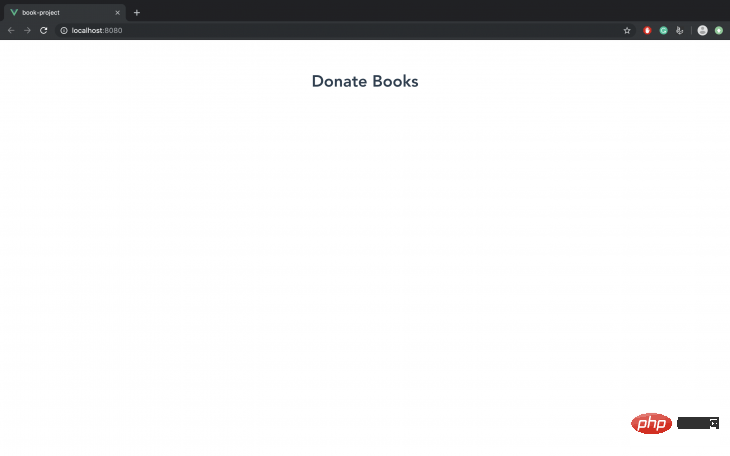
现在,每次加载应用程序时加载Book组件似乎不是一个重要的性能问题。但是,随着应用程序越来越大,在运行时加载每个组件将变得很麻烦。 您的用户不会与应用程序中的每个功能都进行交互,因此只提供他们需要的功能是有意义的。问题是,如何只加载用户需要的内容? 这就是延迟加载和代码分割技术发挥作用的地方。延迟加载会延迟组件的初始加载,在用户导航到位于页面上的位置之前,会阻止加载图像等资源。 代码分割是webpack最初提供的一个特性。Webpack允许您将代码分割成仅在需要时使用的各种包。 Vue通过一个称为动态导入的特性执行代码分解。 此导入使用webpack(或任何模块绑定器,如Parcel)异步加载组件。它的语法包含一个承诺,并包装在一个箭头函数: // dynamic import
import("./components/Book").then(Book => {
// Insert the Book module here
});让我们实现这个在我们的App.vue组件: <template>
<div>
<book></book>
</div>
</template>
<script>
export default {
components: {
Book: () => import("./components/Book")
}
};
</script>在上面的代码示例中,import()函数返回Book组件,这使我们能够异步加载它。 如果我们在浏览器devtools中查看“网络”标签,则有一个由App.js发起的名为0.js的文件。 该文件包含我们的异步组件: 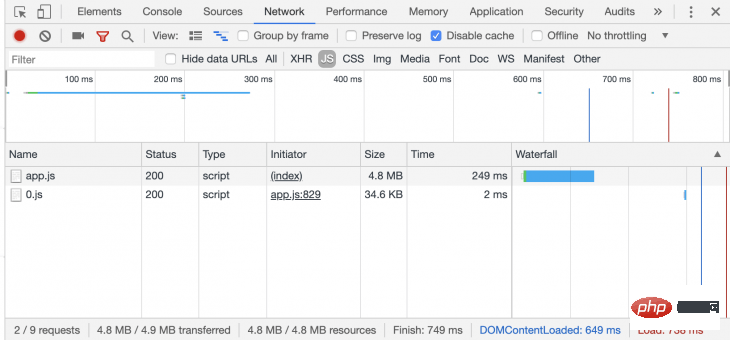
使用异步组件创建一个Vue应用程序 让我们继续构建一个基本的图书捐赠应用程序,以展示如何利用异步组件。最后,我们只想在用户单击Donate按钮时加载Donate组件。 首先,让我们导航到终端并在我们的项目文件夹中安装vue-material。我们将使用这个样式的应用程序: cd book-project
npm i vue-material 我们将在应用程序中包括vue-material导入它在src/main.js: import Vue from 'vue'
import App from './App.vue'
Vue.config.productionTip = false
import VueMaterial from 'vue-material'
import 'vue-material/dist/vue-material.min.css'
import 'vue-material/dist/theme/default.css'
Vue.use(VueMaterial)
new Vue({
render: h => h(App),
}).$mount('#app')现在,让我们来构建之前创建的Book组件: <!--Book.vue-->
<template>
<div id="app">
<md-card md-with-hover v-for="(book, key) in books" v-bind:key="key">
<md-ripple>
<md-card-header>
<div class="md-title">{{book.name}}</div>
<div class="md-subhead">{{book.genre}}</div>
</md-card-header>
<md-card-actions>
<md-button type="primary" @click="addBook(key)">Donate to improve {{book.genre}}</md-button>
</md-card-actions>
</md-ripple>
</md-card>
<div v-if="show">
<md-card-content>
<donate v-bind:selectList="selectList"></donate>
</md-card-content>
</div>
<md-button @click="show = true" id="donate">Donate {{selectList.length}} book(s)</md-button>
</div>
</template>
<script>
export default {
name: 'RegularButtons',
methods: {
addBook (key) {
if(!this.selectList.includes(key)) {
this.selectList.push(key);
}
}
},
components: {
donate: () => import('./Donate')
},
data: () => ({
books: [
{ name: 'Using Creatine', genre: 'Workouts' },
{ name: 'Learn Parkour', genre: 'Sports' },
{ name: 'Snorkelling', genre: 'Diving' },
],
selectList: [],
show: false
})
}
</script>在上面的代码块中,图书列表从图书数组中检索并显示。如果用户单击每本书的按钮,addBook()方法将选择的书推入selectList数组,并显示捐赠图书的总数。 还有一个单独的按钮,专门用于加载异步组件。它的参数show设置为true。这使得v-if语句能够显示donate组件,该组件包含所选书籍的数量。 donate组件已经通过<script>标记中的components属性动态导入。
让我们创建donate组件。在src/components文件夹中,创建一个名为Donate的新文件。并输入下面的代码示例: <template>
<div title="Donate Books" key="donate">
<p v-for="(x, y) in this.selectList" :key="y">
Tip: {{books[Number(x)].name}} is about {{books[Number(x)].genre}}
</p>
</div>
</template>
<script>
export default {
props: ['selectList'],
data: () => ({
books: [
{ name: 'Using Creatine', genre: 'Workouts' },
{ name: 'Learn Parkour', genre: 'Sports' },
{ name: 'Snorkelling', genre: 'Underwater' },
]
})
}
</script>导航到您的终端并运行npm run serve。
如果应用程序编译成功,在浏览器中打开localhost:8080。当你在Devtools中查看网络标签时点击应用程序,当你点击Donate按钮时,Donate组件才会加载。 异步组件的错误处理 异步组件需要尽可能简单,以便快速加载。但是,在我们的异步组件中定义加载和错误组件有助于处理加载状态并在需要时显示错误消息。 In src/components, let's create two components: LoadingState.vue and ErrorState.vue: <!--LoadingState.vue-->
<template>
<p><em>Loading...</em></p>
</template><!--ErrorState.vue-->
<template>
<p>Could not display books. Kindly check your internet conection.</p>
</template>现在,在App.vue中,我们将导入两个组件并将它们添加到Book组件中: <!--App.vue-->
<script>
import LoadingState from "./components/LoadingState"
import ErrorState from "./components/ErrorState"
const Book = import("./components/Book")
export default {
components: {
Book: () => ({
// Book is our default component
component: Book,
// LoadingState is the component that is displayed while our default component
// is loading
loading: LoadingState,
// ErrorState is the component that is displayed should our default component have an // error while loading
error: ErrorState,
// A delay is set up before the loading component is shown
delay: 100,
// Should this timeout be reached, the default component is considered to have failed // to load
timeout: 2000
})
}
};
</script>加载和错误状态不会出现,除非你有一个非常缓慢或错误的互联网连接。为了测试它们是否工作正常,我们将timeout属性设置为0,并尝试加载应用程序。 结论 使用异步组件构建大型应用程序是保持最佳性能的关键。异步组件不仅可以确保由于更快的加载时间,您的保留率会更高,而且还可以帮助您更有效地检测错误,因为组件的作用域是作为函数传递的。如果你想看看这个演示的源代码,你可以在GitHub上找到它。 相关推荐:
2020年前端vue面试题大汇总(附答案) vue教程推荐:2020最新的5个vue.js视频教程精选
更多编程相关知识,请访问:编程入门!! 以上就是Vue项目中使用异步组件来优化性能的详细内容,更多请关注模板之家(www.mb5.com.cn)其它相关文章! |



