火狐支持的改变滚动条的CSS属性有两个:1、scrollbar-color属性,用于设置元素滚动条的颜色,可控制滚动条轨道和滚动条拇指的颜色,语法“scrollbar-color:color|dark|light;”;2、scrollbar-width属性,用于设置显示时元素滚动条的宽度或厚度,语法“scrollbar-width:thin|none|宽度大小值;”。

本教程操作环境:windows7系统、CSS3&&HTML5版、Dell G3电脑。
修改火狐滚动条样式的css属性只有 scrollbar-color 和 scrollbar-width 。
scrollbar-color属性
scrollbar-color属性用于设置元素滚动条的颜色。它可用于分别控制滚动条轨道和滚动条拇指的颜色。滚动条的轨迹是滚动条的背景,它保持固定并显示可以滚动的区域。滚动条的拇指指的是滚动条的移动部分,该部分浮点数在轨道的顶部,表示滚动条的当前位置。
语法:
scrollbar-color:auto | color | dark | light
scrollbar-color: auto; /* 使用浏览器默认的滚动条样式 */

scrollbar-color: dark; /* 使用浏览器默认的深色或者黑色滚动效果 */

scrollbar-color: light; /* 使用浏览器默认的浅色滚动效果 */

scrollbar-color: red #00f; /* 第一个颜色为滚动条的颜色, 第二个颜色为滚动条轨道的颜色 */
示例:
<!DOCTYPE html>
<html>
<head>
  <title>
    CSS | scrollbar-color   </title>
  <style>
    .scrollbar-auto {
      scrollbar-color:auto;

      height:150px;
      width:200px;
      overflow-y:scroll;
      background-color:lightgreen;
    }
  </style>
</head>
<body>
  <h1 style="color:green">
    GeeksforGeeks   </h1>
  <b>
    CSS | scrollbar-color   </b>
  <p>
    The container below has     scrollbar-color set to
    'auto'.
  </p>
  <div class="scrollbar-auto">
    GeeksforGeeks is a computer science     portal with a huge variety of well     written and explained computer science     and programming articles, quizzes and     interview questions. The portal also     has dedicated GATE preparation and     competitive programming sections.
  </div>
</body>
</html>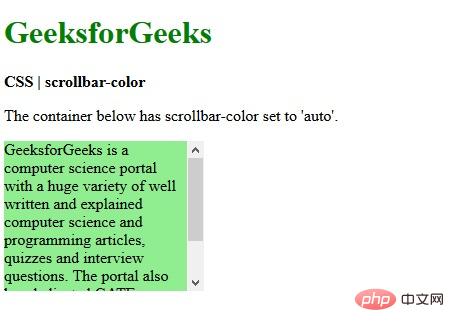
<!DOCTYPE html>
<html>
<head>
  <title>
    CSS | scrollbar-color   </title>
  <style>
    .scrollbar-colored {
      scrollbar-color:red green;

      height:150px;
      width:200px;
      overflow-y:scroll;
      background-color:lightgreen;
    }
  </style>
</head>
<body>
  <h1 style="color:green">
    GeeksforGeeks   </h1>
  <b>
    CSS | scrollbar-color   </b>
  <p>
    The container below has a     red green scrollbar-color.
  </p>
  <div class="scrollbar-colored">
    GeeksforGeeks is a computer science     portal with a huge variety of well     written and explained computer science     and programming articles, quizzes and     interview questions. The portal also     has dedicated GATE preparation and     competitive programming sections.
  </div>
</body>
</html>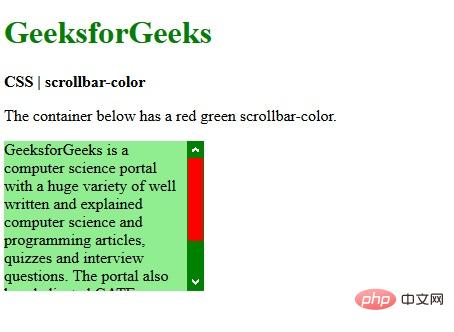
scrollbar-width属性
scrollbar-width 属性允许开发者设置滚动条出现时的厚度
scrollbar-width属性用于设置显示时元素滚动条的宽度或厚度。此属性可用于以下页面上:用户接口要求元素应更突出地显示,并且缩小滚动条宽度可为元素提供更多空间。
语法:
scrollbar-width:auto | thin | none |len
用法:
scrollbar-width: auto; /* 使用浏览器默认的滚动宽度 */

scrollbar-width: thin; /* 设置比默认滚动条宽度更窄的宽度 */

scrollbar-width: none; /* 隐藏滚动条,但是元素还是可以滚动 */

scrollbar-width: 66px; /* 直接设置滚动条的宽度,比如 60px 3vh 4wh 5rem 6rm 等长度 */
属性值:
<!DOCTYPE html>
<html>

<head>
    <title>CSS | scrollbar-width property</title>

    <style>
        .scrollbar-auto {
            scrollbar-width:auto;
            background-color:lightgreen;
            height:150px;
            width:200px;
            overflow-y:scroll;
        }
    </style>
</head>

<body>
    <h1 style="color:green">
        GeeksforGeeks     </h1>

    <b>CSS | scrollbar-width</b>

    <p>scrollbar-width:auto</p>

    <div class="scrollbar-auto">
        GeeksforGeeks is a computer science         portal with a huge variety of well         written and explained computer science         and programming articles, quizzes and         interview questions. The portal also
        has dedicated GATE preparation and         competitive programming sections.
    </div>
</body>

</html>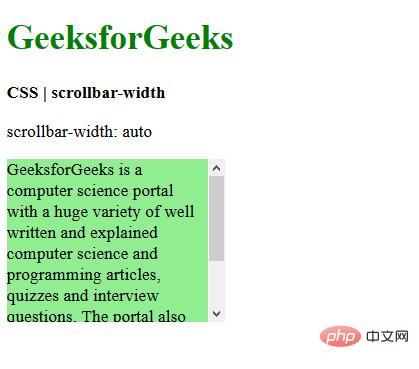
<!DOCTYPE html>
<html>

<head>
    <title>CSS | scrollbar-width</title>

    <style>
        .scrollbar-thin {
            scrollbar-width:thin;
            background-color:lightgreen;
            height:150px;
            width:200px;
            overflow-y:scroll;
        }
    </style>
</head>

<body>
    <h1 style="color:green">
        GeeksforGeeks     </h1>

    <b>CSS | scrollbar-width</b>

    <p>scrollbar-width:thin</p>

    <div class="scrollbar-thin">
        GeeksforGeeks is a computer science         portal with a huge variety of well         written and explained computer science         and programming articles, quizzes and         interview questions. The portal also
        has dedicated GATE preparation and         competitive programming sections.
    </div>
</body>

</html>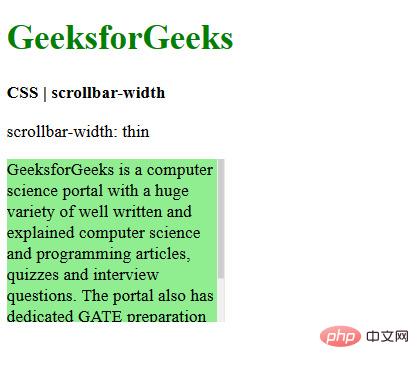
<!DOCTYPE html>
<html>

<head>
    <title>CSS | scrollbar-width</title>

    <style>
        .scrollbar-none {
            scrollbar-width:none;
            background-color:lightgreen;
            height:150px;
            width:200px;
            overflow-y:scroll;
        }
    </style>
</head>

<body>
    <h1 style="color:green">
        GeeksforGeeks     </h1>

    <b>CSS | scrollbar-width</b>

    <p>scrollbar-width:none</p>

    <div class="scrollbar-none">
        GeeksforGeeks is a computer science         portal with a huge variety of well         written and explained computer science         and programming articles, quizzes and         interview questions. The portal also
        has dedicated GATE preparation and         competitive programming sections.
    </div>
</body>

</html>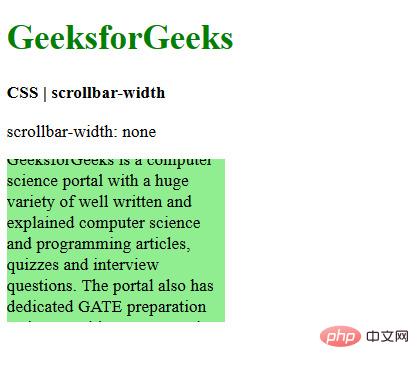
(学习视频分享:css视频教程)
以上就是火狐支持css改变滚动条的属性有哪些的详细内容,更多请关注模板之家(www.mb5.com.cn)其它相关文章!



