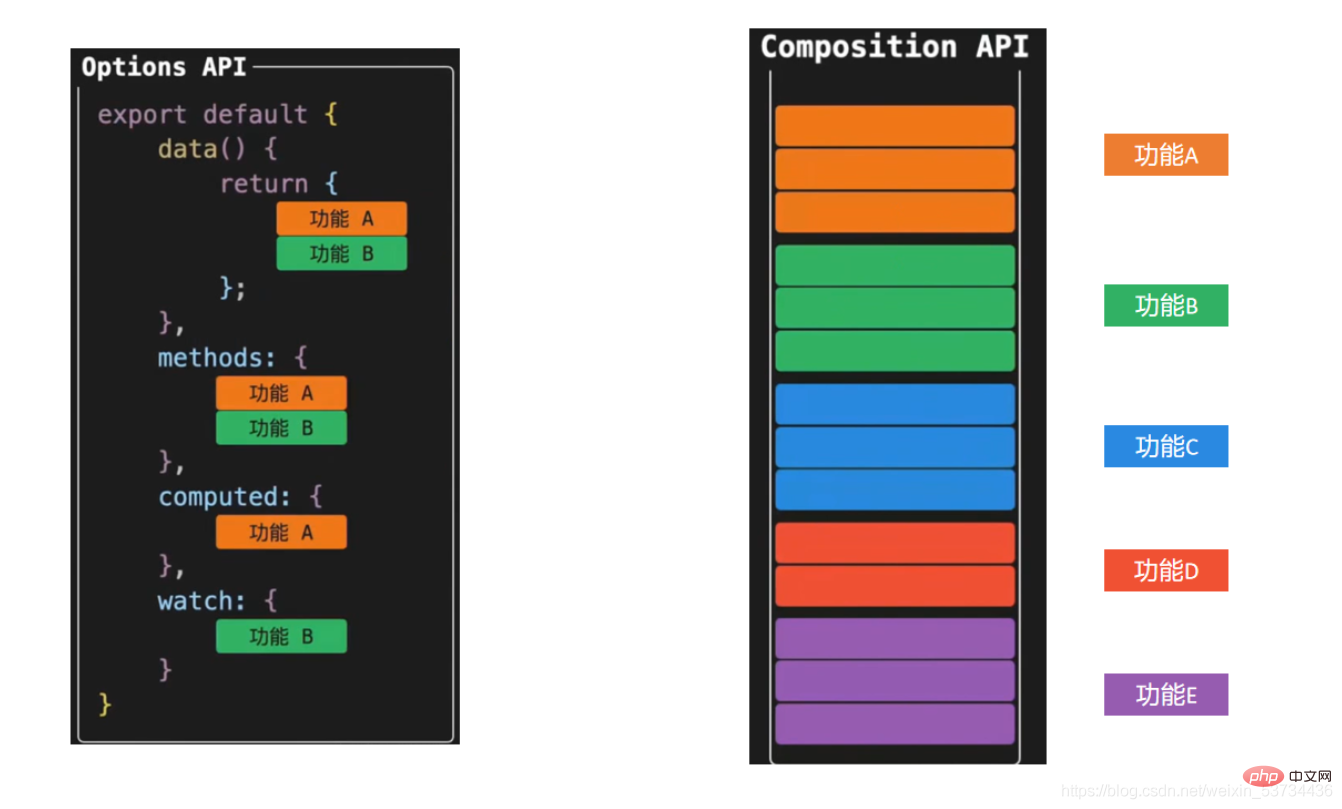
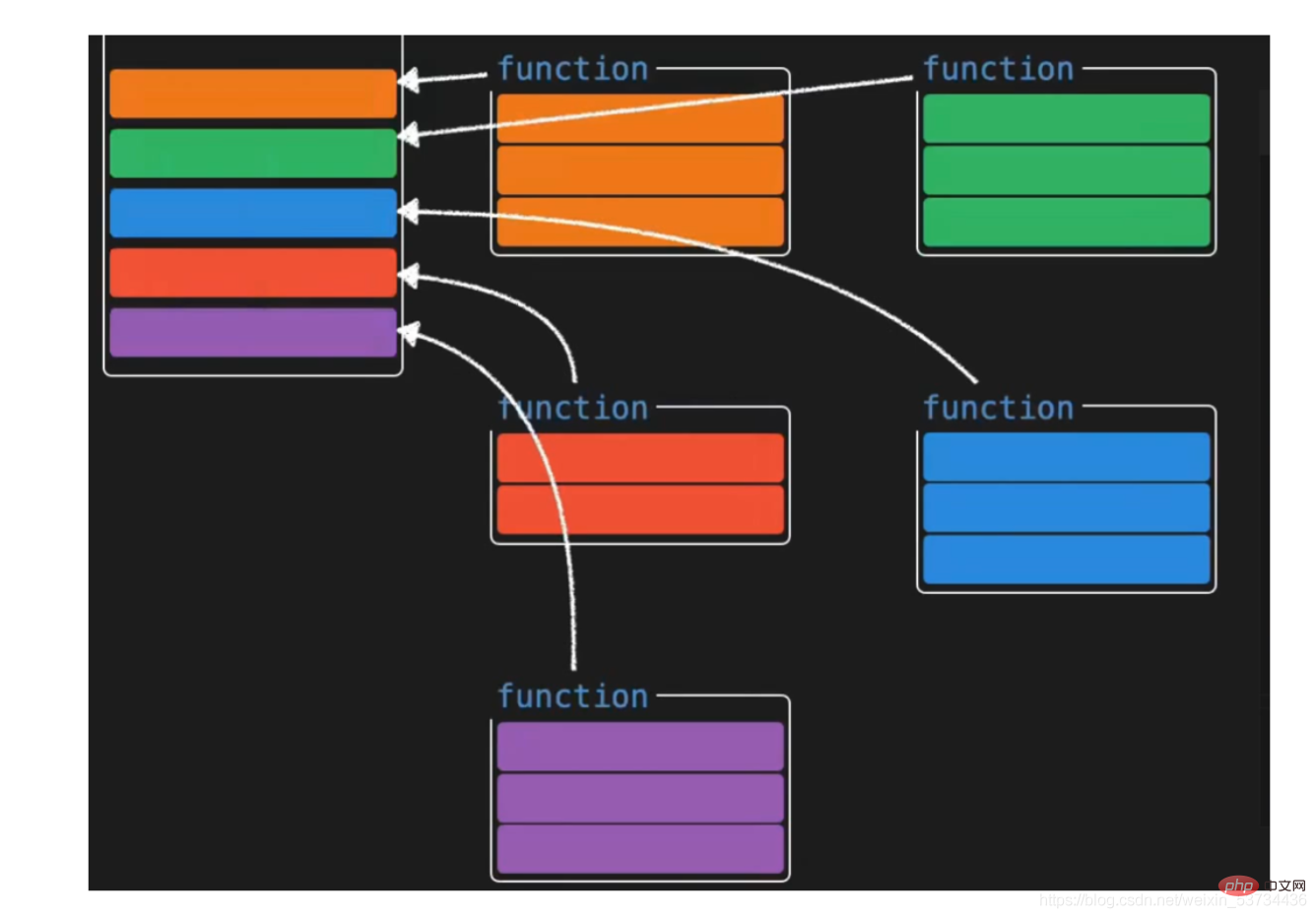
组合式api(Composition API)算是vue3对我们开发者来说非常有价值的一个api更新,我们先不关注具体语法,先对它有一个大的感知。
组合式API
1. composition vs options
2. 案例对比
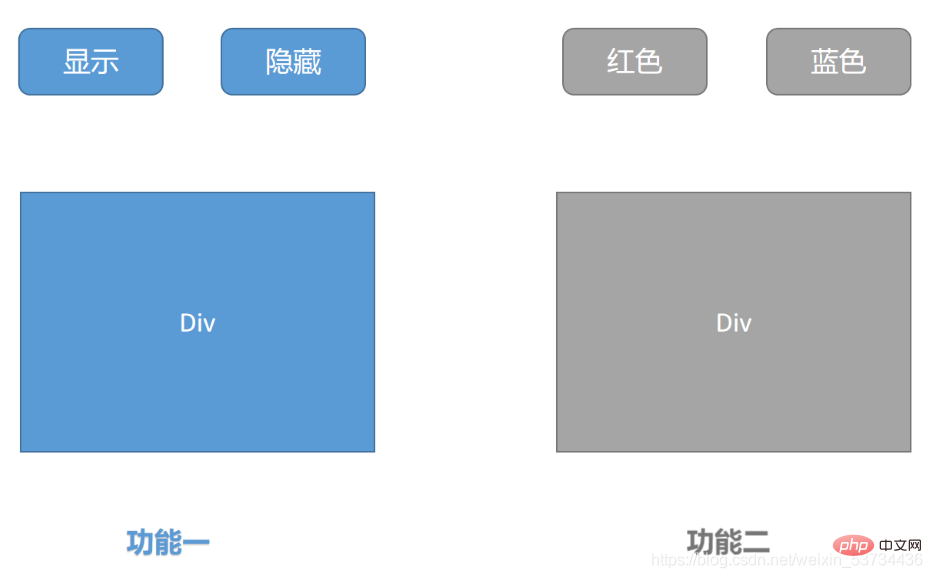
2.1 理解需求
2.2 vue2.x option Api版本<template>
<div>
<!-- 功能一模板 -->
<button @click="show">显示</button>
<button @click="hide">隐藏</button>
<div v-if="showDiv">一个被控制显隐的div</div>
</div>
<div>
<!-- 功能二模板 -->
<button @click="changeRed">红色</button>
<button @click="changeYellow">蓝色</button>
<div :style="`color:${fontColor}`">一个被控制字体颜色的的div</div>
</div>
</template>
<script>
export default {
name: 'App',
data() {
return {
showDiv: true, // 功能一数据
fontColor: '' // 功能二数据
}
},
methods: {
// 功能一方法
show() {
this.showDiv = true
},
hide() {
this.showDiv = false
},
// 功能二方法
changeRed() {
this.fontColor = 'red'
},
changeYellow() {
this.fontColor = 'blue'
}
}
}
</script>2.3 vue3.0 composition api版本<template>
<div>
<!-- 功能一模板 -->
<button @click="show">显示</button>
<button @click="hide">隐藏</button>
<div v-if="showDivFlag">一个被控制显隐的div</div>
</div>
<div>
<!-- 功能二模板 -->
<button @click="changeRed">红色</button>
<button @click="changeBlue">蓝色</button>
<div :style="`color:${fontColor}`">一个被控制字体颜色的的div</div>
</div>
</template>
<script>
import { ref } from 'vue'
export default {
name: 'App',
setup() {
// 功能一
const showDivFlag = ref(true)
function show() {
showDivFlag.value = true
}
function hide() {
showDivFlag.value = false
}
// 功能二
const fontColor = ref('')
function changeRed() {
fontColor.value = 'red'
}
function changeBlue() {
fontColor.value = 'blue'
}
return { showDivFlag, show, hide, fontColor, changeRed, changeBlue }
}
}
</script>2.4 composition api版本优化
<script>import { ref } from 'vue'function useShow() {
  const showpFlag = ref(true)
  function show() {
    showpFlag.value = true
  }
  function hide() {
    showpFlag.value = false
  }
  return { showpFlag, show, hide }}function useColor() {
  const fontColor = ref('')
  function changeRed() {
    fontColor.value = 'red'
  }
  function changeBlue() {
    fontColor.value = 'blue'
  }
  return { fontColor, changeRed, changeBlue }}export default {
  name: 'App',
  setup() {
    // 功能一
    const { showpFlag, show, hide } = useShow()
    // 功能二
    const { fontColor, changeRed, changeBlue } = useColor()
    return { showpFlag, show, hide, fontColor, changeRed, changeBlue }
  }}</script>
以上,我们通过定义功能函数,把俩个功能相关的代码各自抽离到一个独立的小函数中,然后通过在setUp函数中再把俩个小功能函数组合起来,这样一来,我们既可以把setup函数变得清爽,又可以方便维护快速定位功能位置
3. setup入口函数
export default {
  setup () {
    console.log('setup执行了')
    console.log(this)
  },
  beforeCreate() {
    console.log('beforeCreate执行了')
    console.log(this)
  }}
4. 响应式系统API4.1 reactive 函数
使用步骤
代码落地 <template>
<div>{{ state.name }}</div>
<div>{{ state.age }}</div>
<button @click="state.name = 'pink'">改值</button>
</template>
<script>
import { reactive } from 'vue'
export default {
setup () {
const state = reactive({
name: 'cp',
age: 18
})
return {
state
}
}
}
</script>4.2 ref 函数
使用步骤
<template>
  <div>{{ money }}</div>
  <button @click="changeMondy">改值</button>
</template>

<script>
import { ref } from 'vue'
export default {
  setup() {
    let money = ref(100)
    console.log(money.value)
    return {
      money
    }
  }
}
</script>
总结说明:
4.3 toRefs 函数
4.3.1 问题复现还是之前的案例,如果我们想在模板中省略到state,直接书写name和age,你可能会想到,那我在return出去的时候把state中的属性解构出来不就好了 修改前 <template>
<div>{{ state.name }}</div>
<div>{{ state.age }}</div>
<button @click="state.name = 'pink'">改值</button>
</template>
<script>
import { reactive } from 'vue'
export default {
setup() {
const state = reactive({
name: 'cp',
age: 18
})
return {
state
}
}
}
</script>解构修改后 <template>
<div>{{ name }}</div>
<div>{{ age }}</div>
<button @click="name = 'pink'">改值</button>
</template>
<script>
import { reactive } from 'vue'
export default {
setup() {
const state = reactive({
name: 'cp',
age: 18
})
return {
...state
}
}
}
</script>
4.3.2 toRefs包裹处理<template>
<div>{{ name }}</div>
<div>{{ age }}</div>
<button @click="name = 'pink'">改值</button>
</template>
<script>
import { reactive,toRefs } from 'vue'
export default {
setup() {
const state = reactive({
name: 'cp',
age: 18
})
return {
...toRefs(state)
}
}
}
</script>4.4 computed
使用步骤
<template>
  {{ list }}
  {{ filterList }}  <button @click="changeList">change list</button></template><script>import { computed, ref } from 'vue'export default {
  setup() {
    const list = ref([1, 2, 3, 4, 5])
    // 输入大于3的数字
    const filterList = computed(() => {
      return list.value.filter(item => item > 3)
    })
    // 修改list的函数
    function changeList() {
      list.value.push(6, 7, 8)
    }
    return {
      list,
      filterList,
      changeList    }
  }}</script>
4.5 watch 侦听器
使用步骤
4.5.1 普通监听<template>
{{ age }} <button @click="age++">change age</button></template><script>import { ref, watch } from 'vue'export default {
setup() {
const age = ref(18)
watch(() => {
// 返回你想要监听的响应式属性(ref产生的对象必须加.value)
return age.value }, () => {
// 数据变化之后的回调函数
console.log('age发生了变化')
})
return {
age }
}}</script>4.5.2 开启立刻执行
<template>
  {{ age }}  <button @click="age++">change age</button></template><script>import { ref, watch } from 'vue'export default {
  setup() {
    const age = ref(18)
    watch(() => {
      // 返回你想要监听的响应式属性(ref产生的对象必须加.value)
      return age.value    }, () => {
      // 数据变化之后的回调函数
      console.log('age发生了变化')
    },{ immediate: true})
    return {
      age    }
  }}</script>
4.5.3 开启深度监听
<template>
  {{ name }}
  {{ info.age }}  <button @click="name = 'pink'">change name</button>
  <button @click="info.age++">change age</button></template><script>import { reactive, toRefs, watch } from 'vue'export default {
  setup() {
    const state = reactive({
      name: 'cp',
      info: {
        age: 18
      }
    })
    watch(() => {
      return state    }, () => {
      // 数据变化之后的回调函数
      console.log('age发生了变化')
    }, {
      deep: true
    })
    return {
      ...toRefs(state)
    }
  }}</script>
4.5.4 更好的做法
<template>
  {{ name }}
  {{ info.age }}  <button @click="name = 'pink'">change name</button>
  <button @click="info.age++">change age</button></template><script>import { reactive, toRefs, watch } from 'vue'export default {
  setup() {
    const state = reactive({
      name: 'cp',
      info: {
        age: 18
      }
    })
    watch(() => {
      // 详细的告知你要监听谁
      return state.info.age    }, () => {
      // 数据变化之后的回调函数
      console.log('age发生了变化')
    })
    return {
      ...toRefs(state)
    }
  }}</script>
5. 生命周期函数使用步骤
<template>
  <div>生命周期函数</div>
</template>

<script>
import { onMounted } from 'vue'
export default {
  setup() {
    // 时机成熟 回调函数自动执行
    onMounted(() => {
      console.log('mouted生命周期执行了')
    })
     onMounted(() => {
      console.log('mouted生命周期函数又执行了')
    })
  }
}
</script>
6. 父子通信
实现步骤
代码落地 <template>
<son :name="name" @get-msg="getMsg"></son></template><script>import { ref } from 'vue'import Son from './components/son'export default {
components: {
Son },
setup() {
const name = ref('cp')
function getMsg(msg) {
console.log(msg)
}
return {
name,
getMsg }
}}</script>
<template>
  <div>
    {{name}}
    <button @click="setMsgToSon">set</button>
  </div>
</template>

<script>
export default {
  props: {
    name: {
      type: String
    }
  },
  emits: ['get-msg'], // 声明当前组件触发的自定义事件
  setup(props,{emit}) {
    console.log(props.name)
    function setMsgToSon(){
      emit('get-msg','这是一条来自子组件的msg信息')
    }
    return {
      setMsgToSon
    }
  }
}
</script>
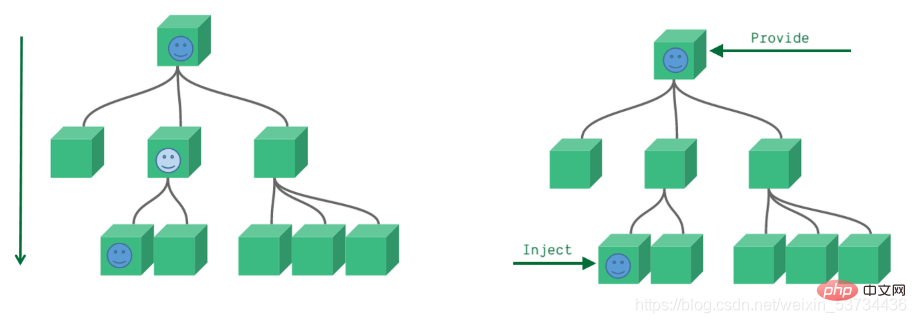
7. provide 和 inject
7.1 基础使用
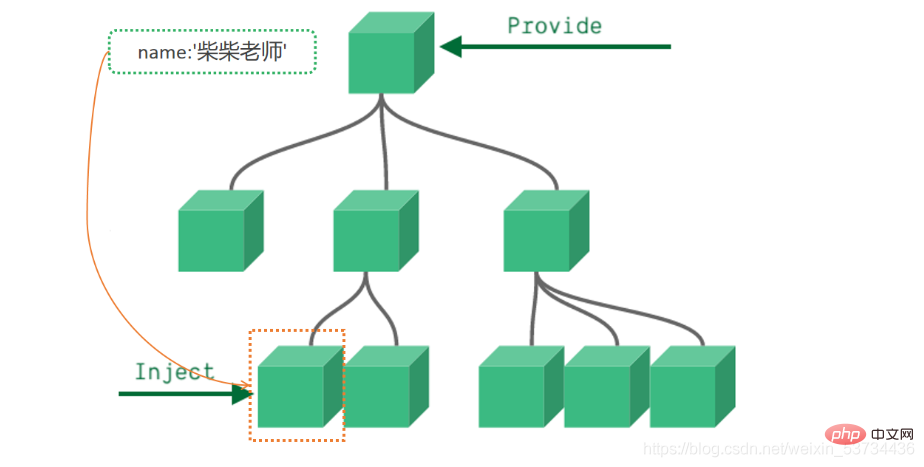
来个需求: 爷组件中有一份数据 传递给孙组件直接使用 实现步骤:
代码落地 <template>
<father></father></template><script>import Father from '@/components/Father'import { provide } from 'vue'export default {
components: {
Father },
setup() {
let name = '柴柴老师'
// 使用provide配置项注入数据 key - value
provide('name', name)
}}</script>
<template>
  我是子组件
  {{ name }}</template><script>import { inject } from 'vue'export default {
  setup() {
    const name = inject('name')
    return {
      name    }
  }}</script>
事实上,只要是后代组件,都可以方便的获取顶层组件提供的数据 7.2 传递响应式数据
<template>
  <father></father>
  <button @click="changeName">change name</button></template><script>import Father from '@/components/Father'import { provide, ref } from 'vue'export default {
  components: {
    Father  },
  setup() {
    // 使用ref转换成响应式再传递
    let name = ref('柴柴老师')
    function changeName(){
      name.value = 'pink'
    }
    provide('name', name)
    return {
      changeName    }
  }}</script>
8. 模板中 ref 的使用
实现步骤
代码落地 <template> 我是一个普通的组件</template>
<template>
  <h1 ref="h1Ref">我是普通dom标签</h1>
  <ref-comoonent ref="comRef"></ref-comoonent></template><script>import { onMounted, ref } from 'vue'import RefComoonent from '@/components/RefComponent'export default {
  components: {
    RefComoonent  },
  setup() {
    const h1Ref = ref(null)
    const comRef = ref(null)
    onMounted(() => {
      console.log(h1Ref.value)
      console.log(comRef.value)
    })
    // 必须return
    return {
      h1Ref,
      comRef    }
  }}</script>
9. 来个案例吧 - Todos核心功能
<template>
  <section class="todoapp">
    <!-- 头部输入框区域 -->
    <header class="header">
      <h1>todos</h1>
      <input
        class="new-todo"
        placeholder="请输入要完成的任务"
        autofocus
        v-model="curTask"
        @keyup.enter="add"
      />
    </header>
    <section class="main">
      <!-- 全选切换input -->
      <input id="toggle-all" class="toggle-all" type="checkbox" v-model="isAll"/>
      <label for="toggle-all">标记所有已经完成</label>
      <ul class="todo-list">
        <!-- 任务列表 -->
        <li v-for="(item, index) in list" :key="item.id">
          <p class="view">
            <!-- 双向绑定 flag -->
            <input class="toggle" type="checkbox" v-model="item.flag" />
            <label>{{ item.name }}</label>
            <!-- 删除按钮 -->
            <button class="destroy" @click="del(index)"></button>
          </p>
        </li>
      </ul>
    </section>
    <footer class="footer">
      <span class="todo-count"> 还未完成的任务有:<strong>{{count}}</strong>项 </span>
    </footer>
  </section></template><script>import { computed, ref } from 'vue'export default {
  setup() {
    const list = ref([
      { id: 1, name: '吃饭', flag: false },
      { id: 2, name: '睡觉', flag: false },
      { id: 3, name: '打豆豆', flag: true }
    ])

    // 删除函数
    function del(index) {
      // index 要删除项的下标值
      // splice
      list.value.splice(index, 1)
    }

    const curTask = ref('')
    function add() {
      // 添加逻辑
      list.value.unshift({
        id: new Date(),
        name: curTask.value,
        flag: false
      })
      curTask.value = ''
    }

    // 全选取消全选
    // {name:"cp"}  console.log(info.name)  info.name = 'pink'
    const isAll = computed({
      // 获取isAll数据的时候会执行get函数
      get() {
        // 当list列表中所有项的flag属性都为true 就为true
        // every
        return list.value.every(item => item.flag === true)
      },
      set(val) {
        // 拿到isAll最新值 遍历一下list 把里面的flag属性设置为最新值
        list.value.forEach(item => {
          item.flag = val        })
      }
    })

    // 计算未完成的任务
    const count = computed(()=>{
      return  list.value.filter(item=>item.flag === false).length    })

    return {
      list,
      del,
      curTask,
      add,
      isAll,
      count    }
  }}</script><style>html,
body {
  margin: 0;
  padding: 0;}button {
  margin: 0;
  padding: 0;
  border: 0;
  background: none;
  font-size: 100%;
  vertical-align: baseline;
  font-family: inherit;
  font-weight: inherit;
  color: inherit;
  -webkit-appearance: none;
  appearance: none;
  -webkit-font-smoothing: antialiased;
  -moz-osx-font-smoothing: grayscale;}body {
  font: 14px "Helvetica Neue", Helvetica, Arial, sans-serif;
  line-height: 1.4em;
  background: #f5f5f5;
  color: #111111;
  min-width: 230px;
  max-width: 550px;
  margin: 0 auto;
  -webkit-font-smoothing: antialiased;
  -moz-osx-font-smoothing: grayscale;
  font-weight: 300;}:focus {
  outline: 0;}.hidden {
  display: none;}.todoapp {
  background: #fff;
  margin: 130px 0 40px 0;
  position: relative;
  box-shadow: 0 2px 4px 0 rgba(0, 0, 0, 0.2), 0 25px 50px 0 rgba(0, 0, 0, 0.1);}.todoapp input::-webkit-input-placeholder {
  font-style: italic;
  font-weight: 300;
  color: rgba(0, 0, 0, 0.4);}.todoapp input::-moz-placeholder {
  font-style: italic;
  font-weight: 300;
  color: rgba(0, 0, 0, 0.4);}.todoapp input::input-placeholder {
  font-style: italic;
  font-weight: 300;
  color: rgba(0, 0, 0, 0.4);}.todoapp h1 {
  position: absolute;
  top: -140px;
  width: 100%;
  font-size: 80px;
  font-weight: 200;
  text-align: center;
  color: #b83f45;
  -webkit-text-rendering: optimizeLegibility;
  -moz-text-rendering: optimizeLegibility;
  text-rendering: optimizeLegibility;}.new-todo,
.edit {
  position: relative;
  margin: 0;
  width: 100%;
  font-size: 24px;
  font-family: inherit;
  font-weight: inherit;
  line-height: 1.4em;
  color: inherit;
  padding: 6px;
  border: 1px solid #999;
  box-shadow: inset 0 -1px 5px 0 rgba(0, 0, 0, 0.2);
  box-sizing: border-box;
  -webkit-font-smoothing: antialiased;
  -moz-osx-font-smoothing: grayscale;}.new-todo {
  padding: 16px 16px 16px 60px;
  border: none;
  background: rgba(0, 0, 0, 0.003);
  box-shadow: inset 0 -2px 1px rgba(0, 0, 0, 0.03);}.main {
  position: relative;
  z-index: 2;
  border-top: 1px solid #e6e6e6;}.toggle-all {
  width: 1px;
  height: 1px;
  border: none; /* Mobile Safari */
  opacity: 0;
  position: absolute;
  right: 100%;
  bottom: 100%;}.toggle-all + label {
  width: 60px;
  height: 34px;
  font-size: 0;
  position: absolute;
  top: -52px;
  left: -13px;
  -webkit-transform: rotate(90deg);
  transform: rotate(90deg);}.toggle-all + label:before {
  content: "?";
  font-size: 22px;
  color: #e6e6e6;
  padding: 10px 27px 10px 27px;}.toggle-all:checked + label:before {
  color: #737373;}.todo-list {
  margin: 0;
  padding: 0;
  list-style: none;}.todo-list li {
  position: relative;
  font-size: 24px;
  border-bottom: 1px solid #ededed;}.todo-list li:last-child {
  border-bottom: none;}.todo-list li.editing {
  border-bottom: none;
  padding: 0;}.todo-list li.editing .edit {
  display: block;
  width: calc(100% - 43px);
  padding: 12px 16px;
  margin: 0 0 0 43px;}.todo-list li.editing .view {
  display: none;}.todo-list li .toggle {
  text-align: center;
  width: 40px;
  /* auto, since non-WebKit browsers doesn't support input styling */
  height: auto;
  position: absolute;
  top: 0;
  bottom: 0;
  margin: auto 0;
  border: none; /* Mobile Safari */
  -webkit-appearance: none;
  appearance: none;}.todo-list li .toggle {
  opacity: 0;}.todo-list li .toggle + label {
  background-image: url("data:image/svg+xml;utf8,%3Csvg%20xmlns%3D%22http%3A//www.w3.org/2000/svg%22%20width%3D%2240%22%20height%3D%2240%22%20viewBox%3D%22-10%20-18%20100%20135%22%3E%3Ccircle%20cx%3D%2250%22%20cy%3D%2250%22%20r%3D%2250%22%20fill%3D%22none%22%20stroke%3D%22%23ededed%22%20stroke-width%3D%223%22/%3E%3C/svg%3E");
  background-repeat: no-repeat;
  background-position: center left;}.todo-list li .toggle:checked + label {
  background-image: url("data:image/svg+xml;utf8,%3Csvg%20xmlns%3D%22http%3A//www.w3.org/2000/svg%22%20width%3D%2240%22%20height%3D%2240%22%20viewBox%3D%22-10%20-18%20100%20135%22%3E%3Ccircle%20cx%3D%2250%22%20cy%3D%2250%22%20r%3D%2250%22%20fill%3D%22none%22%20stroke%3D%22%23bddad5%22%20stroke-width%3D%223%22/%3E%3Cpath%20fill%3D%22%235dc2af%22%20d%3D%22M72%2025L42%2071%2027%2056l-4%204%2020%2020%2034-52z%22/%3E%3C/svg%3E");}.todo-list li label {
  word-break: break-all;
  padding: 15px 15px 15px 60px;
  display: block;
  line-height: 1.2;
  transition: color 0.4s;
  font-weight: 400;
  color: #4d4d4d;}.todo-list li.completed label {
  color: #cdcdcd;
  text-decoration: line-through;}.todo-list li .destroy {
  display: none;
  position: absolute;
  top: 0;
  right: 10px;
  bottom: 0;
  width: 40px;
  height: 40px;
  margin: auto 0;
  font-size: 30px;
  color: #cc9a9a;
  margin-bottom: 11px;
  transition: color 0.2s ease-out;}.todo-list li .destroy:hover {
  color: #af5b5e;}.todo-list li .destroy:after {
  content: "×";}.todo-list li:hover .destroy {
  display: block;}.todo-list li .edit {
  display: none;}.todo-list li.editing:last-child {
  margin-bottom: -1px;}.footer {
  padding: 10px 15px;
  height: 20px;
  text-align: center;
  font-size: 15px;
  border-top: 1px solid #e6e6e6;}.footer:before {
  content: "";
  position: absolute;
  right: 0;
  bottom: 0;
  left: 0;
  height: 50px;
  overflow: hidden;
  box-shadow: 0 1px 1px rgba(0, 0, 0, 0.2), 0 8px 0 -3px #f6f6f6,
    0 9px 1px -3px rgba(0, 0, 0, 0.2), 0 16px 0 -6px #f6f6f6,
    0 17px 2px -6px rgba(0, 0, 0, 0.2);}.todo-count {
  float: left;
  text-align: left;}.todo-count strong {
  font-weight: 300;}.filters {
  margin: 0;
  padding: 0;
  list-style: none;
  position: absolute;
  right: 0;
  left: 0;}.filters li {
  display: inline;}.filters li a {
  color: inherit;
  margin: 3px;
  padding: 3px 7px;
  text-decoration: none;
  border: 1px solid transparent;
  border-radius: 3px;}.filters li a:hover {
  border-color: rgba(175, 47, 47, 0.1);}.filters li a.selected {
  border-color: rgba(175, 47, 47, 0.2);}.clear-completed,
html .clear-completed:active {
  float: right;
  position: relative;
  line-height: 20px;
  text-decoration: none;
  cursor: pointer;}.clear-completed:hover {
  text-decoration: underline;}.info {
  margin: 65px auto 0;
  color: #4d4d4d;
  font-size: 11px;
  text-shadow: 0 1px 0 rgba(255, 255, 255, 0.5);
  text-align: center;}.info p {
  line-height: 1;}.info a {
  color: inherit;
  text-decoration: none;
  font-weight: 400;}.info a:hover {
  text-decoration: underline;}/*
	Hack to remove background from Mobile Safari.
	Can't use it globally since it destroys checkboxes in Firefox
*/@media screen and (-webkit-min-device-pixel-ratio: 0) {
  .toggle-all,
  .todo-list li .toggle {
    background: none;
  }

  .todo-list li .toggle {
    height: 40px;
  }}@media (max-width: 430px) {
  .footer {
    height: 50px;
  }

  .filters {
    bottom: 10px;
  }}</style>
以上就是超详细!图文讲解Vue3的组合式API!的详细内容,更多请关注模板之家(www.mb5.com.cn)其它相关文章!  |