本篇文章给大家带来了关于JavaScript中面向对象的相关知识,其中包括面向对象、构造函数以及继承的相关问题,希望对大家有帮助。
|
本篇文章给大家带来了关于JavaScript中面向对象的相关知识,其中包括面向对象、构造函数以及继承的相关问题,希望对大家有帮助。
1、面向对象面向对象更贴近我们的实际生活, 可以使用面向对象描述现实世界事物. 但是事物分为具体的事物和抽象的事物 面向对象的思维特点:
1.1、对象在 JavaScript 中,对象是一组无序的相关属性和方法的集合,所有的事物都是对象,例如字符串、数值、数组、函数等。 对象是由属性和方法组成的
1.2、类在 ES6 中新增加了类的概念,可以使用 class 关键字声明一个类,之后以这个类来实例化对象。
1.2.1、创建类class name {
// class body}
var XX = new name(); 注意:类必须使用 1.2.2、构造函数constructor()方法是类的构造函数(默认方法),用于传递参数,返回实例对象,通过 new 命令生成对象实例时,自动调用该方法。如果没有显示定义, 类内部会自动给我们创建一个constructor() <script>
// 1. 创建类 class 创建一个 明星类
class Star {
// constructor 构造器或者构造函数
constructor(uname, age) {
this.uname = uname;
this.age = age;
}
}
// 2. 利用类创建对象 new
var ldh = new Star('刘德华', 18);
var zxy = new Star('张学友', 20);
console.log(ldh);
console.log(zxy);</script>
1.2.3、类中添加方法语法: class Person {
constructor(name,age) {
// constructor 称为构造器或者构造函数
this.name = name;
this.age = age;
}
say() {
console.log(this.name + '你好');
}} var ldh = new Person('刘德华', 18); ldh.say()注意: 方法之间不能加逗号分隔,同时方法不需要添加 function 关键字。 <script>
// 1. 创建类 class 创建一个 明星类
class Star {
// 类的共有属性放到 constructor 里面
constructor(uname, age) {
this.uname = uname;
this.age = age;
}
sing(song) {
console.log(this.uname + song);
}
}
// 2. 利用类创建对象 new
var ldh = new Star('刘德华', 18);
var zxy = new Star('张学友', 20);
console.log(ldh);
console.log(zxy);
// (1) 我们类里面所有的函数不需要写function
// (2) 多个函数方法之间不需要添加逗号分隔
ldh.sing('冰雨');
zxy.sing('李香兰');</script>
1.3 、类的继承现实中的继承:子承父业,比如我们都继承了父亲的姓。 程序中的继承:子类可以继承父类的一些属性和方法。 语法: // 父类class Father {
}// 子类继承父类class Son extends Father {
}看一个实例: <script>
// 父类有加法方法
class Father {
constructor(x, y) {
this.x = x;
this.y = y;
}
sum() {
console.log(this.x + this.y);
}
}
// 子类继承父类加法方法 同时 扩展减法方法
class Son extends Father {
constructor(x, y) {
// 利用super 调用父类的构造函数
// super 必须在子类this之前调用
super(x, y);
this.x = x;
this.y = y;
}
subtract() {
console.log(this.x - this.y);
}
}
var son = new Son(5, 3);
son.subtract();
son.sum();</script>1.4、super关键字
1.4.1、调用父类的构造函数语法: // 父类class Person {
constructor(surname){
this.surname = surname;
}}// 子类继承父类class Student entends Person {
constructor(surname,firstname) {
super(surname); //调用父类的 constructor(surname)
this.firstname = firstname; //定义子类独有的属性
}}注意:子类在构造函数中使用super,必须放到this前面(必须先调用父类的构造方法,在使用子类构造方法) 案例: // 父类class Father {
constructor(surname){
this.surname = surname;
}
saySurname() {
console.log('我的姓是' + this.surname);
}}// 子类继承父类class Son entends Father {
constructor(surname,firstname) {
super(surname); //调用父类的 constructor(surname)
this.firstname = firstname; //定义子类独有的属性
}
sayFirstname() {
console.log('我的名字是:' + this.firstname);
}}var damao = new Son('刘','德华');damao.saySurname();damao.sayFirstname();1.4.2、调用父类的普通函数语法: class Father {
say() {
return '我是爸爸';
}}class Son extends Father {
say(){
// super.say() super调用父类的方法
return super.say() + '的儿子';
}}var damao = new Son();console.log(damao.say());
1.4、三个注意点
<body>
    <button>点击</button>
    <script>
        var that;
        var _that;
        class Star {
            constructor(uname, age) {
                // constructor 里面的this 指向的是 创建的实例对象
                that = this;
                this.uname = uname;
                this.age = age;
                // this.sing();
                this.btn = document.querySelector('button');
                this.btn.onclick = this.sing;
            }
            sing() {
            // 这个sing方法里面的this 指向的是 btn 这个按钮,因为这个按钮调用了这个函数
                console.log(that.uname);
                // that里面存储的是constructor里面的this
            }
            dance() {
                // 这个dance里面的this 指向的是实例对象 ldh 因为ldh 调用了这个函数
                _that = this;
                console.log(this);
            }
        }
        var ldh = new Star('刘德华');
        console.log(that === ldh);
        ldh.dance();
        console.log(_that === ldh);

        // 1. 在 ES6 中类没有变量提升,所以必须先定义类,才能通过类实例化对象

        // 2. 类里面的共有的属性和方法一定要加this使用.
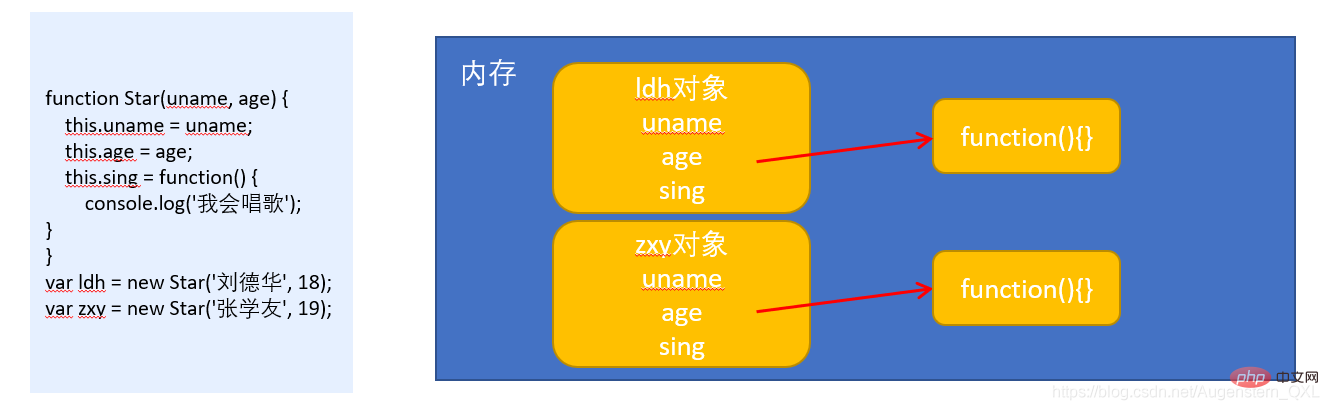
</script></body>2、构造函数和原型2.1、概述在典型的 OOP 的语言中(如 Java),都存在类的概念,类就是对象的模板,对象就是类的实例,但在 ES6之前, JS 中并没用引入类的概念。 ES6, 全称 ECMAScript 6.0 ,2015.06 发版。但是目前浏览器的 JavaScript 是 ES5 版本,大多数高版本的浏览器也支持 ES6,不过只实现了 ES6 的部分特性和功能。 在 ES6之前 ,对象不是基于类创建的,而是用一种称为构建函数的特殊函数来定义对象和它们的特征。
// 1. 利用 new Object() 创建对象var obj1 = new Object();// 2. 利用对象字面量创建对象var obj2 = {};// 3.利用构造函数创建对象function Star(uname,age) {
    this.uname = uname;
    this.age = age;
    this.sing = function() {
        console.log('我会唱歌');
    }}var ldh = new Star('刘德华',18);
注意:
2.2、构造函数
new 在执行时会做四件事
2.2.1、静态成员和实例成员JavaScript 的构造函数中可以添加一些成员,可以在构造函数本身上添加,也可以在构造函数内部的
// 构造函数中的属性和方法我们称为成员,成员可以添加
function Star(uname,age) {
    this.uname = uname;
    this.age = age;
    this.sing = function() {
        console.log('我会唱歌');
    }
}
var ldh = new Star('刘德华',18);

// 实例成员就是构造函数内部通过this添加的成员  uname age sing  就是实例成员
// 实例成员只能通过实例化的对象来访问
ldh.sing();
Star.uname; // undefined     不可以通过构造函数来访问实例成员

// 静态成员就是在构造函数本身上添加的成员 sex 就是静态成员
// 静态成员只能通过构造函数来访问
Star.sex = '男';
Star.sex;
ldh.sex; // undefined 不能通过对象来访问2.2.2、构造函数的问题构造函数方法很好用,但是存在浪费内存的问题。
2.3、构造函数原型 prototype
<body>
    <script>
        // 1. 构造函数的问题.
        function Star(uname, age) {
    		//公共属性定义到构造函数里面
            this.uname = uname;
            this.age = age;
            // this.sing = function() {
            //     console.log('我会唱歌');
            // }
        }
		//公共的方法我们放到原型对象身上
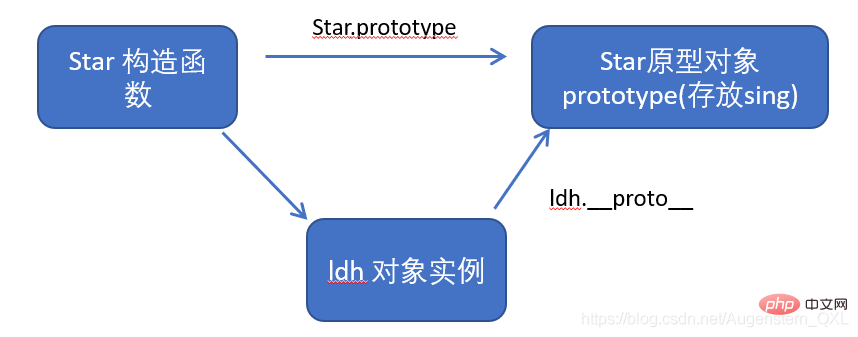
        Star.prototype.sing = function() {
            console.log('我会唱歌');
        }
        var ldh = new Star('刘德华', 18);
        var zxy = new Star('张学友', 19);
        console.log(ldh.sing === zxy.sing);
        ldh.sing();
        zxy.sing();
        // 2. 一般情况下,我们的公共属性定义到构造函数里面, 公共的方法我们放到原型对象身上
    </script></body>
问答:原型是什么?
问答:原型的作用是什么?
2.4、对象原型 __ proto __
<body>
    <script>
        function Star(uname, age) {
            this.uname = uname;
            this.age = age;
        }
        Star.prototype.sing = function() {
            console.log('我会唱歌');
        }
        var ldh = new Star('刘德华', 18);
        var zxy = new Star('张学友', 19);
        ldh.sing();
        console.log(ldh);
		// 对象身上系统自己添加一个 __proto__ 指向我们构造函数的原型对象 prototype
        console.log(ldh.__proto__ === Star.prototype);
        // 方法的查找规则: 首先先看ldh 对象身上是否有 sing 方法,如果有就执行这个对象上的sing
        // 如果没有sing 这个方法,因为有 __proto__ 的存在,就去构造函数原型对象prototype身上去查找sing这个方法
    </script></body>
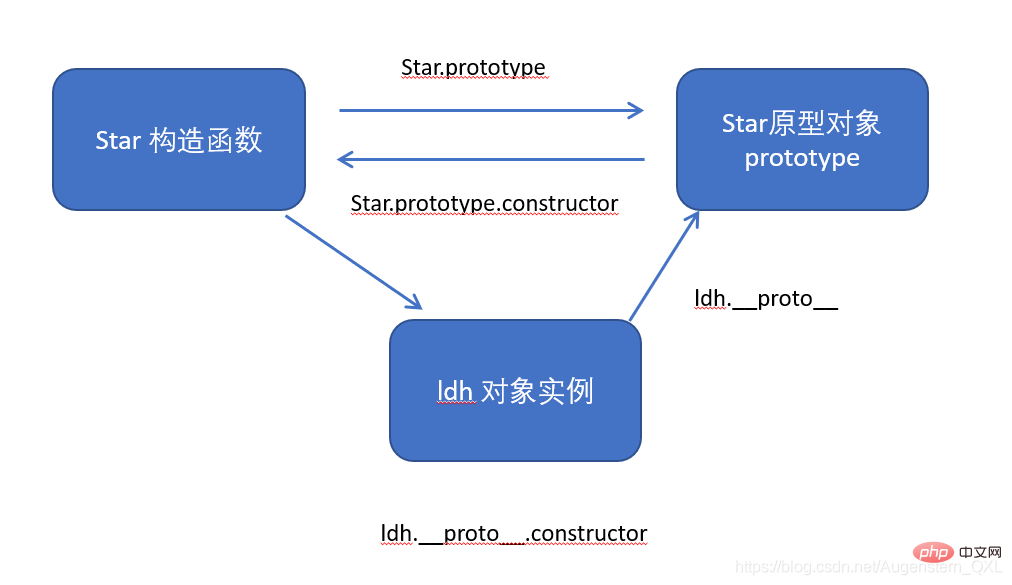
2.5、constructor 构造函数
具体请看实例配合理解 <body>
<script>
function Star(uname, age) {
this.uname = uname;
this.age = age;
}
// 很多情况下,我们需要手动的利用constructor 这个属性指回 原来的构造函数
// Star.prototype.sing = function() {
// console.log('我会唱歌');
// };
// Star.prototype.movie = function() {
// console.log('我会演电影');
// }
Star.prototype = {
// 如果我们修改了原来的原型对象,给原型对象赋值的是一个对象,则必须手动的利用constructor指回原来的构造函数
constructor: Star,
sing: function() {
console.log('我会唱歌');
},
movie: function() {
console.log('我会演电影');
}
}
var ldh = new Star('刘德华', 18);
var zxy = new Star('张学友', 19);
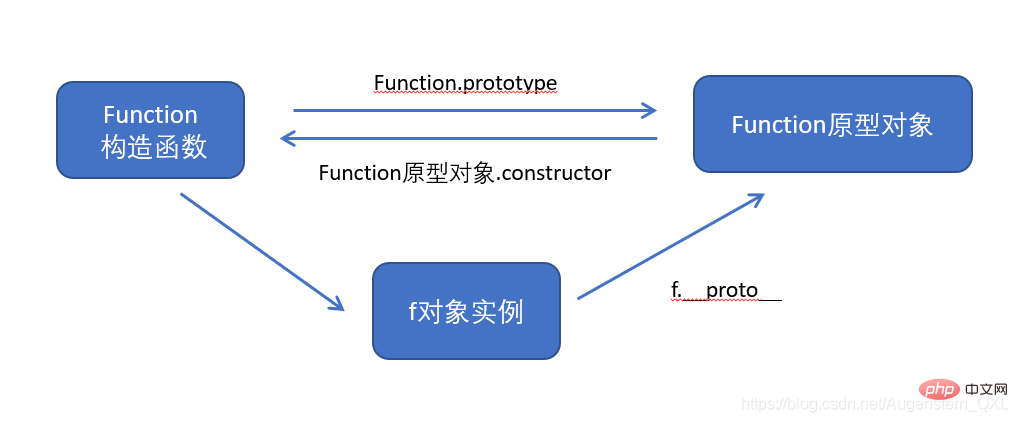
</script></body>2.6、构造函数、实例、原型对象三者关系
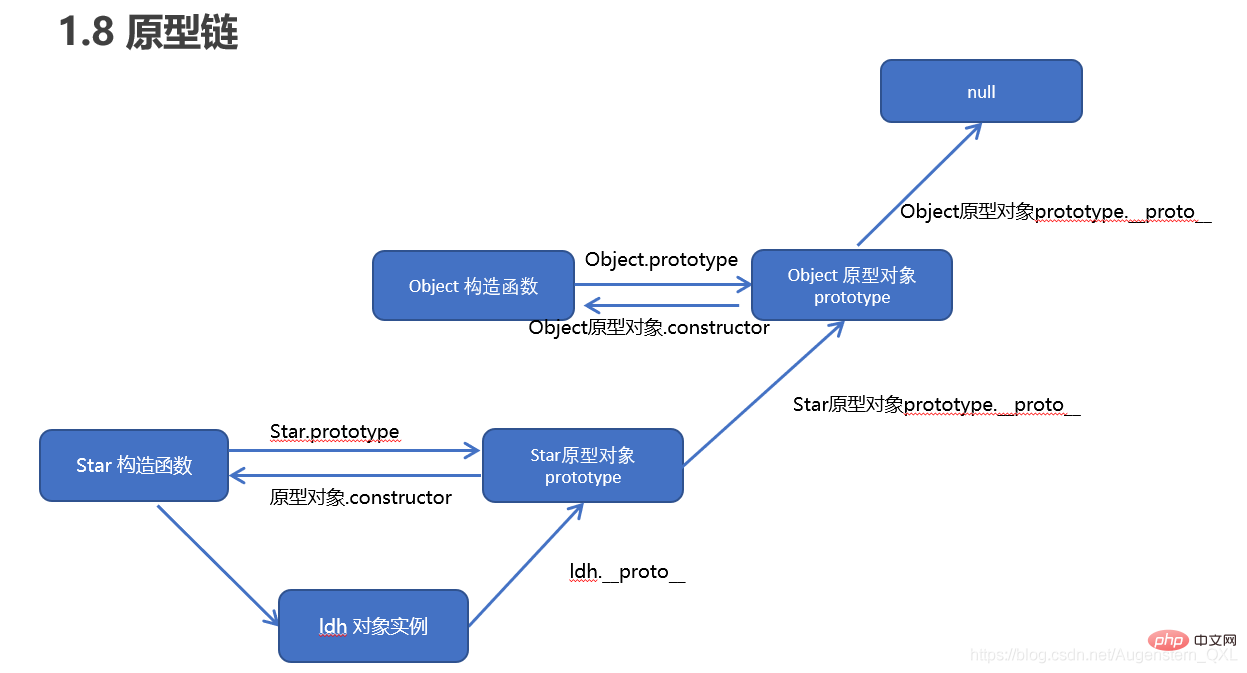
2.7、原型链查找规则
<body>
    <script>
        function Star(uname, age) {
            this.uname = uname;
            this.age = age;
        }
        Star.prototype.sing = function() {
            console.log('我会唱歌');
        }
        var ldh = new Star('刘德华', 18);
        // 1. 只要是对象就有__proto__ 原型, 指向原型对象
        console.log(Star.prototype);
        console.log(Star.prototype.__proto__ === Object.prototype);
        // 2.我们Star原型对象里面的__proto__原型指向的是 Object.prototype
        console.log(Object.prototype.__proto__);
        // 3. 我们Object.prototype原型对象里面的__proto__原型  指向为 null
    </script></body>
2.8、原型对象this指向
<body>
    <script>
        function Star(uname, age) {
            this.uname = uname;
            this.age = age;
        }
        var that;
        Star.prototype.sing = function() {
            console.log('我会唱歌');
            that = this;
        }
        var ldh = new Star('刘德华', 18);
        // 1. 在构造函数中,里面this指向的是对象实例 ldh
        ldh.sing();
        console.log(that === ldh);

        // 2.原型对象函数里面的this 指向的是 实例对象 ldh
    </script></body>
2.9、扩展内置对象
<body>
    <script>
        // 原型对象的应用 扩展内置对象方法

        Array.prototype.sum = function() {
            var sum = 0;
            for (var i = 0; i < this.length; i++) {
                sum += this[i];
            }
            return sum;
        };
        // Array.prototype = {
        //     sum: function() {
        //         var sum = 0;
        //         for (var i = 0; i < this.length; i++) {
        //             sum += this[i];
        //         }
        //         return sum;
        //     }

        // }
        var arr = [1, 2, 3];
        console.log(arr.sum());
        console.log(Array.prototype);
        var arr1 = new Array(11, 22, 33);
        console.log(arr1.sum());
    </script></body>
注意:
3、继承ES6 之前并没有给我们提供
3.1、call()调用这个函数,并且修改函数运行时的 this 指向 fun.call(thisArg,arg1,arg2,......)
示例 <body>
<script>
// call 方法
function fn(x, y) {
console.log('我希望我的希望有希望');
console.log(this); // Object{...}
console.log(x + y); // 3
}
var o = {
name: 'andy'
};
// fn();
// 1. call() 可以调用函数
// fn.call();
// 2. call() 可以改变这个函数的this指向 此时这个函数的this 就指向了o这个对象
fn.call(o, 1, 2);
</script></body>3.2、借用构造函数继承父类型属性
<body>
    <script>
        // 借用父构造函数继承属性
        // 1. 父构造函数
        function Father(uname, age) {
            // this 指向父构造函数的对象实例
            this.uname = uname;
            this.age = age;
        }
        // 2 .子构造函数
        function Son(uname, age, score) {
            // this 指向子构造函数的对象实例
            Father.call(this, uname, age);
            this.score = score;
        }
        var son = new Son('刘德华', 18, 100);
        console.log(son);
    </script></body>
3.3、借用原型对象继承父类型方法
核心原理:
<body>
    <script>
        // 借用父构造函数继承属性
        // 1. 父构造函数
        function Father(uname, age) {
            // this 指向父构造函数的对象实例
            this.uname = uname;
            this.age = age;
        }
        Father.prototype.money = function() {
            console.log(100000);

        };
        // 2 .子构造函数
        function Son(uname, age, score) {
            // this 指向子构造函数的对象实例
            Father.call(this, uname, age);
            this.score = score;
        }
        // Son.prototype = Father.prototype;  这样直接赋值会有问题,如果修改了子原型对象,父原型对象也会跟着一起变化
        Son.prototype = new Father();
        // 如果利用对象的形式修改了原型对象,别忘了利用constructor 指回原来的构造函数
        Son.prototype.constructor = Son;
        // 这个是子构造函数专门的方法
        Son.prototype.exam = function() {
            console.log('孩子要考试');

        }
        var son = new Son('刘德华', 18, 100);
        console.log(son);
        console.log(Father.prototype);
        console.log(Son.prototype.constructor);
    </script></body>
3.3 类的本质
4、ES5新增方法ES5 给我们新增了一些方法,可以很方便的操作数组或者字符串
4.1、数组方法
4.1.1、forEach()array.forEach(function(currentValue,index,arr))
<body>
    <script>
        // forEach 迭代(遍历) 数组
        var arr = [1, 2, 3];
        var sum = 0;
        arr.forEach(function(value, index, array) {
            console.log('每个数组元素' + value);
            console.log('每个数组元素的索引号' + index);
            console.log('数组本身' + array);
            sum += value;
        })
        console.log(sum);
</script></body>4.1.2、filter()筛选数组array.filter(function(currentValue,index,arr))
<body>
    <script>
        // filter 筛选数组
        var arr = [12, 66, 4, 88, 3, 7];
        var newArr = arr.filter(function(value, index) {
            // return value >= 20;
            return value % 2 === 0;
        });
        console.log(newArr);
    </script></body>
4.1.3、some()
<body>
    <script>
        // some 查找数组中是否有满足条件的元素
        var arr1 = ['red', 'pink', 'blue'];
        var flag1 = arr1.some(function(value) {
            return value == 'pink';
        });
        console.log(flag1);
        // 1. filter 也是查找满足条件的元素 返回的是一个数组 而且是把所有满足条件的元素返回回来
        // 2. some 也是查找满足条件的元素是否存在  返回的是一个布尔值 如果查找到第一个满足条件的元素就终止循环
    </script></body>
4.2、字符串方法
<body>
    <input type="text"> <button>点击</button>
    <p></p>
    <script>
        // trim 方法去除字符串两侧空格
        var str = '   an  dy   ';
        console.log(str);
        var str1 = str.trim();
        console.log(str1);
        var input = document.querySelector('input');
        var btn = document.querySelector('button');
        var p = document.querySelector('p');
        btn.onclick = function() {
            var str = input.value.trim();
            if (str === '') {
                alert('请输入内容');
            } else {
                console.log(str);
                console.log(str.length);
                p.innerHTML = str;
            }
        }
</script></body>4.3、对象方法4.3.1、Object.keys()
<body>
    <script>
        // 用于获取对象自身所有的属性
        var obj = {
            id: 1,
            pname: '小米',
            price: 1999,
            num: 2000
        };
        var arr = Object.keys(obj);
        console.log(arr);
        arr.forEach(function(value) {
            console.log(value);
            // id
            // pname
            // price
            // num
        })
    </script></body>
4.3.2、Object.defineProperty()
Object.defineProperty(obj,prop,descriptor)
<body>
    <script>
        // Object.defineProperty() 定义新属性或修改原有的属性
        var obj = {
            id: 1,
            pname: '小米',
            price: 1999
        };
        // 1. 以前的对象添加和修改属性的方式
        // obj.num = 1000;
        // obj.price = 99;
        // console.log(obj);
        // 2. Object.defineProperty() 定义新属性或修改原有的属性
        Object.defineProperty(obj, 'num', {
            value: 1000,
            enumerable: true
        });
        console.log(obj);
        Object.defineProperty(obj, 'price', {
            value: 9.9
        });
        console.log(obj);
        Object.defineProperty(obj, 'id', {
            // 如果值为false 不允许修改这个属性值 默认值也是false
            writable: false,
        });
        obj.id = 2;
        console.log(obj);
        Object.defineProperty(obj, 'address', {
            value: '中国山东蓝翔技校xx单元',
            // 如果只为false 不允许修改这个属性值 默认值也是false
            writable: false,
            // enumerable 如果值为false 则不允许遍历, 默认的值是 false
            enumerable: false,
            // configurable 如果为false 则不允许删除这个属性 不允许在修改第三个参数里面的特性 默认为false
            configurable: false
        });
        console.log(obj);
        console.log(Object.keys(obj));
        delete obj.address;
        console.log(obj);
        delete obj.pname;
        console.log(obj);
        Object.defineProperty(obj, 'address', {
            value: '中国山东蓝翔技校xx单元',
            // 如果值为false 不允许修改这个属性值 默认值也是false
            writable: true,
            // enumerable 如果值为false 则不允许遍历, 默认的值是 false
            enumerable: true,
            // configurable 如果为false 则不允许删除这个属性 默认为false
            configurable: true
        });
        console.log(obj.address);
    </script></body>
5、函数进阶5.1、函数的定义方式
var fn = new Function('参数1','参数2',.....,'函数体');
<body>
    <script>
        //  函数的定义方式

        // 1. 自定义函数(命名函数)

        function fn() {};

        // 2. 函数表达式 (匿名函数)

        var fun = function() {};


        // 3. 利用 new Function('参数1','参数2', '函数体');
		//             Function 里面参数都必须是字符串格式,执行效率低,较少写

        var f = new Function('a', 'b', 'console.log(a + b)');
        f(1, 2);
        // 4. 所有函数都是 Function 的实例(对象)
        console.dir(f);
        // 5. 函数也属于对象
        console.log(f instanceof Object);
    </script></body>
5.2、函数的调用方式
<body>
    <script>
        // 函数的调用方式

        // 1. 普通函数
        function fn() {
            console.log('人生的巅峰');

        }
        // fn();   fn.call()
        // 2. 对象的方法
        var o = {
            sayHi: function() {
                console.log('人生的巅峰');

            }
        }
        o.sayHi();
        // 3. 构造函数
        function Star() {};
        new Star();
        // 4. 绑定事件函数
        // btn.onclick = function() {};   // 点击了按钮就可以调用这个函数
        // 5. 定时器函数
        // setInterval(function() {}, 1000);  这个函数是定时器自动1秒钟调用一次
        // 6. 立即执行函数
        (function() {
            console.log('人生的巅峰');
        })();
        // 立即执行函数是自动调用
    </script></body>
5.3、函数内this的指向
<body>
    <button>点击</button>
    <script>
        // 函数的不同调用方式决定了this 的指向不同
        // 1. 普通函数 this 指向window
        function fn() {
            console.log('普通函数的this' + this);
        }
        window.fn();
        // 2. 对象的方法 this指向的是对象 o
        var o = {
            sayHi: function() {
                console.log('对象方法的this:' + this);
            }
        }
        o.sayHi();
        // 3. 构造函数 this 指向 ldh 这个实例对象 原型对象里面的this 指向的也是 ldh这个实例对象
        function Star() {};
        Star.prototype.sing = function() {

        }
        var ldh = new Star();
        // 4. 绑定事件函数 this 指向的是函数的调用者 btn这个按钮对象
        var btn = document.querySelector('button');
        btn.onclick = function() {
            console.log('绑定时间函数的this:' + this);
        };
        // 5. 定时器函数 this 指向的也是window
        window.setTimeout(function() {
            console.log('定时器的this:' + this);

        }, 1000);
        // 6. 立即执行函数 this还是指向window
        (function() {
            console.log('立即执行函数的this' + this);
        })();
    </script></body>
5.4、改变函数内部this指向
5.4.1、call() 方法
<body>
    <script>
        // 改变函数内this指向  js提供了三种方法  call()  apply()  bind()

        // 1. call()
        var o = {
            name: 'andy'
        }

        function fn(a, b) {
            console.log(this);
            console.log(a + b);

        };
        fn.call(o, 1, 2);
        // call 第一个可以调用函数 第二个可以改变函数内的this 指向
        // call 的主要作用可以实现继承
        function Father(uname, age, sex) {
            this.uname = uname;
            this.age = age;
            this.sex = sex;
        }

        function Son(uname, age, sex) {
            Father.call(this, uname, age, sex);
        }
        var son = new Son('刘德华', 18, '男');
        console.log(son);
    </script></body>
5.4.2、apply()方法
<body>
    <script>
        // 改变函数内this指向  js提供了三种方法  call()  apply()  bind()

        // 2. apply()  应用 运用的意思
        var o = {
            name: 'andy'
        };

        function fn(arr) {
            console.log(this);
            console.log(arr); // 'pink'

        };
        fn.apply(o, ['pink']);
        // 1. 也是调用函数 第二个可以改变函数内部的this指向
        // 2. 但是他的参数必须是数组(伪数组)
        // 3. apply 的主要应用 比如说我们可以利用 apply 借助于数学内置对象求数组最大值
        // Math.max();
        var arr = [1, 66, 3, 99, 4];
        var arr1 = ['red', 'pink'];
        // var max = Math.max.apply(null, arr);
        var max = Math.max.apply(Math, arr);
        var min = Math.min.apply(Math, arr);
        console.log(max, min);
    </script></body>
5.4.3、bind()方法
<body>
    <button>点击</button>
    <button>点击</button>
    <button>点击</button>
    <script>
        // 改变函数内this指向  js提供了三种方法  call()  apply()  bind()

        // 3. bind()  绑定 捆绑的意思
        var o = {
            name: 'andy'
        };

        function fn(a, b) {
            console.log(this);
            console.log(a + b);


        };
        var f = fn.bind(o, 1, 2);
        f();
        // 1. 不会调用原来的函数   可以改变原来函数内部的this 指向
        // 2. 返回的是原函数改变this之后产生的新函数
        // 3. 如果有的函数我们不需要立即调用,但是又想改变这个函数内部的this指向此时用bind
        // 4. 我们有一个按钮,当我们点击了之后,就禁用这个按钮,3秒钟之后开启这个按钮
        // var btn1 = document.querySelector('button');
        // btn1.onclick = function() {
        //     this.disabled = true; // 这个this 指向的是 btn 这个按钮
        //     // var that = this;
        //     setTimeout(function() {
        //         // that.disabled = false; // 定时器函数里面的this 指向的是window
        //         this.disabled = false; // 此时定时器函数里面的this 指向的是btn
        //     }.bind(this), 3000); // 这个this 指向的是btn 这个对象
        // }
        var btns = document.querySelectorAll('button');
        for (var i = 0; i < btns.length; i++) {
            btns[i].onclick = function() {
                this.disabled = true;
                setTimeout(function() {
                    this.disabled = false;
                }.bind(this), 2000);
            }
        }
</script></body>5.4.4、总结call apply bind 总结: 相同点:
区别点:
主要应用场景
相关推荐:javascript学习教程 以上就是爆肝整理JavaScript之面向对象(总结分享)的详细内容,更多请关注模板之家(www.mb5.com.cn)其它相关文章! |