在制作网页时我们往往需要在网页中添加一些背景颜色、背景图像让网页更加美观,吸引访问者的眼球。CSS 中提供了一系列用于设置 HTML 元素背景效果的属性,如下所示:
- background-color:设置元素的背景颜色;
- background-image:设置元素的背景图像;
- background-repeat:控制背景图像是否重复;
- background-attachment:控制背景图像是否跟随窗口滚动;
- background-position:控制背景图像在元素中的位置;
- background-size:设置背景图像的尺寸;
- background-origin:设置 background-position 属性相对于什么位置来定位背景图像;
- background-clip:设置背景图像的显示区域;
- background:背景属性的缩写,可以在一个声明中设置所有的背景属性。
1. background-color
您可以使用 background-color 属性为元素设置一个背景颜色,该属性支持以下几种属性值:
| 值 | 描述 |
|---|
| color_name | 使用具体颜色名称为元素设置背景颜色(例如 red) |
| hex_number | 使用十六进制码为元素设置背景颜色(例如 #ff0000) |
| rgb_number | 使用 rgb() 函数为元素设置背景颜色(例如 rgb(255,0,0)) |
| transparent | 默认值,设置背景颜色为透明,大多数情况下我们并不会用到它。但如果您不希望某个元素拥有背景颜色,或者不希望用户对浏览器的设置(比如开启夜间模式、护眼模式)影响到您的设计,那么就可以使用 transparent 来将颜色设置为透明的 |
| inherit | 从父元素继承对背景颜色的设置 |
【示例】使用 background-color 为元素设置背景颜色:
<!DOCTYPE html>
<html>
<head>
    <title>CSS背景</title>
    <style>
    #bg {
        color: white;
        background-color: blue;
        margin: 20px;   /*设置外边距为 20px*/
        padding: 20px;  /*设置内边距为 20px*/
        border: 10px dotted yellow;  /*设置一个宽 10px 的黄色虚线边框*/
    }
    </style>
</head>
<body>
    <p id="bg">background-color 属性</p>
</body>
</html>
<!DOCTYPE html>
<html>
<head>
<title>CSS背景</title>
<style>
#bg {
color: white;
background-color: blue;
margin: 20px; /*设置外边距为 20px*/
padding: 20px; /*设置内边距为 20px*/
border: 10px dotted yellow; /*设置一个宽 10px 的黄色虚线边框*/
}
</style>
</head>
<body>
<p id="bg">background-color 属性</p>
</body>
</html>运行结果如下图所示:
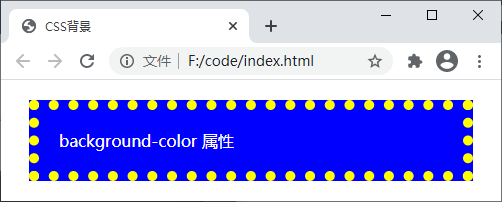
图:background-color 属性演示
通过运行结果可以看出 background-color 属性能够为元素设置一种纯色的背景,这种颜色会填充元素的内容、内边距以及边框区域(也可以理解为边框及以内的所有区域),对于元素边框以外的区域(外边距)则没有影响。
2. background-image
background-image 用来为某个元素设置背景图像,默认情况下浏览器会从元素内容的左上角开始(若有内边距则从元素内边距区域的左上角开始),在水平和垂直方向上重复背景图像,以填充整个元素区域,您可以使用 background-repeat 属性来控制背景图像是否重复或如何重复。
background-image 属性的可选值如下:
| 值 | 描述 |
|---|
| url('URL') | 指向图像的路径,可以将 url() 看作是一个函数,括号中的 URL 为图像的具体路径 |
| none | 默认值,不显示背景图像 |
| inherit | 从父元素继承背景图像的设置 |
【示例】使用 background-image 属性将图片【

】设置为元素的背景图像:
<!DOCTYPE html>
<html>
<head>
    <title>CSS背景</title>
    <style>
    #bg {
        color: red;
        background-image: url('./bg-image.png');
        margin: 20px;   /*设置外边距为 20px*/
        padding: 20px;  /*设置内边距为 20px*/
        border: 10px dotted red;  /*设置一个宽 10px 的红色虚线边框*/
    }
    </style>
</head>
<body>
    <p id="bg">background-image 属性</p>
</body>
</html>
<!DOCTYPE html>
<html>
<head>
<title>CSS背景</title>
<style>
#bg {
color: red;
background-image: url('./bg-image.png');
margin: 20px; /*设置外边距为 20px*/
padding: 20px; /*设置内边距为 20px*/
border: 10px dotted red; /*设置一个宽 10px 的红色虚线边框*/
}
</style>
</head>
<body>
<p id="bg">background-image 属性</p>
</body>
</html>运行结果如下图所示:
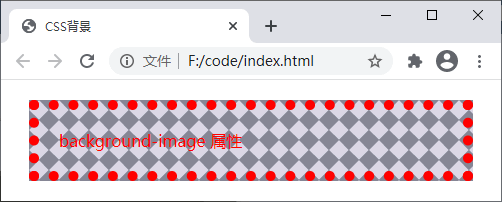
图:background-image 属性演示
背景图像的覆盖区域与背景颜色相同,同样会填充元素的内容、内边距以及边框区域,对于元素边框以外的区域(外边距)则没有影响。
3. background-repeat
默认情况下背景图像会从元素内容的左上角开始(若有内边距则从元素内边距区域的左上角开始),在水平和垂直方向上重复背景图像以填充整个元素区域(不包括元素的外边距区域),您可以使用 background-repeat 属性用来设置背景图像是否重复或如何重复,该属性的可选值如下:
| 值 | 描述 |
|---|
| repeat | 默认值,背景图像将在垂直方向和水平方向上重复 |
| repeat-x | 背景图像仅在水平方向上重复 |
| repeat-y | 背景图像仅在垂直方向上重复 |
| no-repeat | 背景图像仅显示一次,不在任何方向上重复 |
| inherit | 从父元素继承 background-repeat 属性的设置 |
【示例】使用 background-repeat 属性让背景图像只在水平方向上重复:
<!DOCTYPE html>
<html>
<head>
    <title>CSS背景</title>
    <style>
    #bg {
        color: black;
        background-image: url('./bg-image.png');
        background-repeat: repeat-x;
        margin: 20px;   /*设置外边距为 20px*/
        padding: 20px;  /*设置内边距为 20px*/
        border: 10px dotted red;  /*设置一个宽 10px 的红色虚线边框*/
    }
    </style>
</head>
<body>
    <p id="bg">background-repeat 属性</p>
</body>
</html>
<!DOCTYPE html>
<html>
<head>
<title>CSS背景</title>
<style>
#bg {
color: black;
background-image: url('./bg-image.png');
background-repeat: repeat-x;
margin: 20px; /*设置外边距为 20px*/
padding: 20px; /*设置内边距为 20px*/
border: 10px dotted red; /*设置一个宽 10px 的红色虚线边框*/
}
</style>
</head>
<body>
<p id="bg">background-repeat 属性</p>
</body>
</html>运行结果如下图所示:
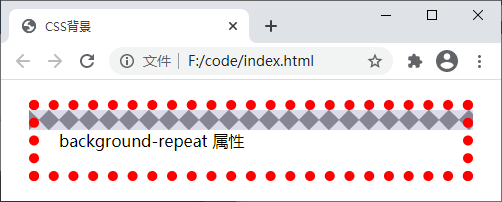
图:background-repeat 属性演示
4. background-position
background-position 属性用来设置背景图像的起始位置,该属性的可选值如下:
| 值 | 描述 |
|---|
left top(左上)、
left center(左中)、
left bottom(左下)、
right top(右上)、
right center(右中)、
right bottom(右下)、
center top(中上)、
center center(居中)、
center bottom(中下) | 使用一些关键词表示背景图像的位置,如果您仅设置第一个关键词,那么第二个将默认为 center |
| x% y% | 使用百分比表示背景图像距离元素左上角的距离,x% 为水平方向,y% 为垂直方向,左上角为 0% 0%,右下角是 100% 100%,如果您仅设置第一个值,那么另一个值将是 50%,默认值为 0% 0% |
| xpos ypos | 使用像素(px)或者其它 CSS 单位表示背景图像距离元素左上角的距离,xpos 为水平方向,ypos 为垂直方向,左上角为 0px 0px,右下角视元素的尺寸而定,百分比和单位的形式可以混用,如果您仅设置第一个值,那么另一个值将默认为 50% |
【示例】使用 background-position 属性来设置背景图像的位置:
<!DOCTYPE html>
<html>
<head>
    <title>CSS背景</title>
    <style>
    #bg {
        color: black;
        background-image: url('./bg-image.png');
        background-repeat: no-repeat;
        background-position: 0% 50%;
        margin: 20px;   /*设置外边距为 20px*/
        padding: 20px;  /*设置内边距为 20px*/
        border: 10px dotted red;  /*设置一个宽 10px 的红色虚线边框*/
    }
    </style>
</head>
<body>
    <p id="bg">background-position 属性</p>
</body>
</html>
<!DOCTYPE html>
<html>
<head>
<title>CSS背景</title>
<style>
#bg {
color: black;
background-image: url('./bg-image.png');
background-repeat: no-repeat;
background-position: 0% 50%;
margin: 20px; /*设置外边距为 20px*/
padding: 20px; /*设置内边距为 20px*/
border: 10px dotted red; /*设置一个宽 10px 的红色虚线边框*/
}
</style>
</head>
<body>
<p id="bg">background-position 属性</p>
</body>
</html>运行结果如下图所示:
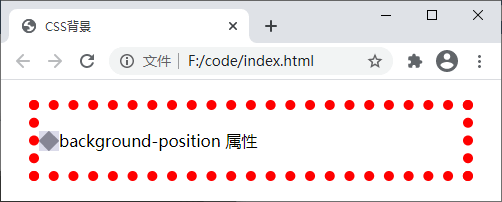
图:background-position 属性演示
5. background-size
background-size 属性用来设置背景图像的尺寸,该属性的可选值如下:
| 值 | 描述 |
|---|
| xpos ypos | 使用像素(px)或其它 CSS 单位来设置背景图像的高度和宽度,xpos 表示宽度,ypos 表示高度,如果只设置第一个值,那么第二个值将被设置为默认值 auto(自动) |
| x% y% | 使用百分比表示背景图像相对于所在元素宽度与高度的百分比,x% 表示宽度,y% 表示高度,如果只设置第一个值,那么第二个值将被设置为默认值 auto(自动) |
| cover | 保持背景图像的横纵比例并将图像缩放至足够大,使背景图像可以完全覆盖元素所在的区域,这么做可能会导致背景图像的某些部分超出元素区域而无法显示 |
| contain | 保持背景图像的横纵比例并将图像缩放至足够大,使背景图像可以完整的显示在元素所在区域,背景图像可能无法完全覆盖整个元素区域 |
【示例】使用 background-size 属性设置背景图像的尺寸,并将背景图像横向铺满整个元素区域:
<!DOCTYPE html>
<html>
<head>
    <title>CSS背景</title>
    <style>
    body {
        background-image: url('./bg-image.png');
        background-repeat: repeat-x;
        background-size: contain;
    }
    </style>
</head>
<body>
    <p>background-size 属性</p>
</body>
</html>
<!DOCTYPE html>
<html>
<head>
<title>CSS背景</title>
<style>
body {
background-image: url('./bg-image.png');
background-repeat: repeat-x;
background-size: contain;
}
</style>
</head>
<body>
<p>background-size 属性</p>
</body>
</html>运行结果如下图所示:
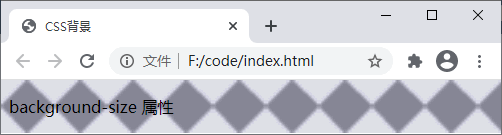
图:background-size 属性演示
6. background
background 是背景属性的简写形式,通过它不仅可以为元素设置某个背景属性,还可以同时设置多个或者所有的背景属性。在设置多个背景属性时并没有固定的顺序,但推荐使用如下顺序进行设置:
background-color || background-image || background-position [/ background-size]? || background-repeat || background-attachment || background-origin || background-clip
在设置多个背景属性时,有以下几点需要注意:
- 每个属性之间使用空格进行分隔;
- 如果同时设置 background-position 和 background-size 属性,这两个属性之间需要使用斜线
/ 分隔,并且需要遵循 background-position 属性在前 background-size 属性在后的顺序; - 如果同时设置 background-origin 和 background-clip 属性,需要遵循 background-origin 属性在前 background-clip 属性在后的顺序。如果 background-origin 与 background-clip 属性的值相同,则可以只设置一个值。
【示例】通过 background 同时设置多个背景属性:
<!DOCTYPE html>
<html>
<head>
    <title>CSS背景</title>
    <style>
    #bg {
        background: #ccc url('./bg-image.png') 0px 0px/contain repeat-x border-box;
        margin: 20px;   /*设置外边距为 20px*/
        padding: 20px;  /*设置内边距为 20px*/
        border: 10px dotted red;  /*设置一个宽 10px 的红色虚线边框*/
    }
    </style>
</head>
<body>
    <p id="bg">background 属性</p>
</body>
</html>
<!DOCTYPE html>
<html>
<head>
<title>CSS背景</title>
<style>
#bg {
background: #ccc url('./bg-image.png') 0px 0px/contain repeat-x border-box;
margin: 20px; /*设置外边距为 20px*/
padding: 20px; /*设置内边距为 20px*/
border: 10px dotted red; /*设置一个宽 10px 的红色虚线边框*/
}
</style>
</head>
<body>
<p id="bg">background 属性</p>
</body>
</html>运行结果如下图所示:
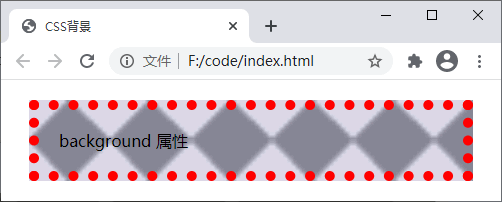
图:background 属性演示
background 属性还支持设置多组属性值(比如上面示例中的 #ccc url('./bg-image.png') 0px 0px/contain repeat-x border-box就可以看作是一组属性),每组属性值之间使用逗号,分隔。但需要注意的是 background-color 属性不能设置多个,并且只能在最后一组属性值中设置。
如果设置的多组属性中,背景图像之间存在重叠,那么前面设置的背景图像会覆盖在后面的背景图像之上。示例代码如下:
<!DOCTYPE html>
<html>
<head>
    <title>CSS背景</title>
    <style>
    body {
        background: url("./css.png") 10px 10px/60px 60px no-repeat padding-box,
                    url("./css.png") 50px 30px/120px 120px no-repeat content-box,
                    url("./css.png") 140px 40px/200px 100px no-repeat content-box #58a;
    }
    </style>
</head>
<body>
</body>
</html>
<!DOCTYPE html>
<html>
<head>
<title>CSS背景</title>
<style>
body {
background: url("./css.png") 10px 10px/60px 60px no-repeat padding-box,
url("./css.png") 50px 30px/120px 120px no-repeat content-box,
url("./css.png") 140px 40px/200px 100px no-repeat content-box #58a;
}
</style>
</head>
<body>
</body>
</html>运行结果如下图所示:
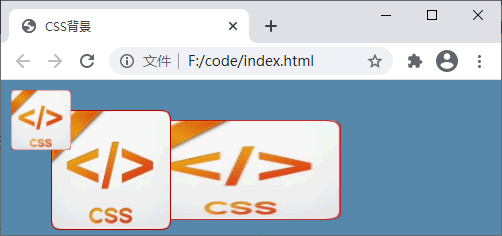
图:多重背景层叠效果