yum php7.1增加扩展的方法:1、通过yum安装php7.1;2、通过“yum -y install php-mysql php-gd php-ldap php-odbc...”命令添加PHP常用扩展即可。

本文操作环境:centos7系统、PHP7.1版、DELL G3电脑
yum php7.1怎么增加扩展?
CentOS 7下部署php7.1和开启MySQL扩展的方法教程
前言
之前在CentOS7安装php7.1的时候有遇到PHP源及PHP7.1不支持MySQL扩展问题,上午抽空安装了下终于解决了这两个问题,特此记录备忘。
简单安装(yum方式)
安装软件源
添加epel源
[root@opstrip.com opt]# rpm --import /etc/pki/rpm-gpg/RPM-GPG-KEY*
[root@opstrip.com opt]# rpm -Uvh http://mirrors.rit.edu/fedora/epel//7/x86_64/e/epel-release-7-9.noarch.rpm
添加remi源
[root@opstrip.com opt]# rpm -Uvh http://rpms.remirepo.net/enterprise/remi-release-7.rpm
安装并更新软件
安装yum-config-manager实用程序
[root@opstrip.com opt]# yum -y install yum-utils
更新系统当前软件版本
[root@opstrip.com opt]# yum -y update
更新完成后,就可以安装所需要的PHP版本了。
安装PHP
以上准备工作完成后,就可以安装所需的PHP版本了。
对于PHP5.4
[root@opstrip.com opt]# yum -y install php
安装前可尝试yum search php54搜索可安装的软件包。
对于PHP7.0
[root@opstrip.com opt]# yum-config-manager --enable remi-php70
[root@opstrip.com opt]# yum -y install php php-opcache
安装前可尝试yum search php70搜索可安装的软件包。
对于PHP7.1
[root@opstrip.com opt]# yum-config-manager --enable remi-php71
[root@opstrip.com opt]# yum -y install php php-opcache
安装前可尝试yum search php71搜索可安装的软件包。
完成后还需要添加PHP常用扩展:
[root@opstrip.com opt]# yum -y install php-mysql php-gd php-ldap php-odbc php-pear php-xml php-xmlrpc php-mbstring php-soap curl curl-devel
对于Nginx
[root@opstrip.com opt]# yum -y install nginx nginx-mod-http-perl nginx-mod-stream nginx-filesystem nginx-mod-mail nginx-mod-http-image-filter nginx-all-modules nginx-mod-http-geoip nginx-mod-http-xslt-filter
安装前仍建议尝试yum search nginx搜索可安装的软件包。
安装完成后配置PHP及Nginx并启动用以测试phpinfo页面,这时候应该能正常显示。
源码编译安装
安装前的准备
下载PHP安装包
[root@opstrip.com opt]# wget -O php-7.1.5.tar.gz http://cn2.php.net/distributions/php-7.1.5.tar.gz
解压
[root@opstrip.com opt]# tar xf php-7.1.5.tar.gz
安装依赖包
[root@opstrip.com php-7.1.5]# yum install -y libxml2 libxml2-devel openssl openssl-devel bzip2 bzip2-devel libcurl libcurl-devel libjpeg libjpeg-devel libpng libpng-devel freetype freetype-devel gmp gmp-devel libmcrypt libmcrypt-devel readline readline-devel libxslt libxslt-devel
配置安装
编译配置
[root@opstrip.com opt]# cd php-7.1.5
[root@opstrip.com php-7.1.5]# ./configure \
--prefix=/usr/local/php \
--with-config-file-path=/etc \
--enable-fpm \
--with-fpm-user=nginx \
--with-fpm-group=nginx \
--enable-inline-optimization \
--disable-debug \
--disable-rpath \
--enable-shared \
--enable-soap \
--with-libxml-dir \
--with-xmlrpc \
--with-openssl \
--with-mcrypt \
--with-mhash \
--with-pcre-regex \
--with-sqlite3 \
--with-zlib \
--enable-bcmath \
--with-iconv \
--with-bz2 \
--enable-calendar \
--with-curl \
--with-cdb \
--enable-dom \
--enable-exif \
--enable-fileinfo \
--enable-filter \
--with-pcre-dir \
--enable-ftp \
--with-gd \
--with-openssl-dir \
--with-jpeg-dir \
--with-png-dir \
--with-zlib-dir \
--with-freetype-dir \
--enable-gd-native-ttf \
--enable-gd-jis-conv \
--with-gettext \
--with-gmp \
--with-mhash \
--enable-json \
--enable-mbstring \
--enable-mbregex \
--enable-mbregex-backtrack \
--with-libmbfl \
--with-onig \
--enable-pdo \
--with-mysqli=mysqlnd \
--with-pdo-mysql=mysqlnd \
--with-zlib-dir \
--with-pdo-sqlite \
--with-readline \
--enable-session \
--enable-shmop \
--enable-simplexml \
--enable-sockets \
--enable-sysvmsg \
--enable-sysvsem \
--enable-sysvshm \
--enable-wddx \
--with-libxml-dir \
--with-xsl \
--enable-zip \
--enable-mysqlnd-compression-support \
--with-pear \
--enable-opcache
具体可以参考PHP官方安装说明文档:http://php.net/manual/zh/install.unix.nginx.php
编译安装
[root@opstrip.com php-7.1.5]# make && make install
配置环境变量:
在/etc/profile末尾追加export PATH=$PATH:/usr/local/php/bin,然后执行source /etc/profile生效后查看php版本:
[root@opstrip.com php-7.1.5]# php -v
PHP 7.1.5 (cli) (built: May 31 2017 16:12:38) ( NTS )
Copyright (c) 1997-2017 The PHP Group
Zend Engine v3.1.0, Copyright (c) 1998-2017 Zend Technologies
安装后的配置
配置php-fpm
安装完成后可以通过sapi/fpm/php-fpm.server来启动php-fpm了。不过为了以后管理方便,通常需要将配置文件统一放到/etc目录下,并将php-fpm.server添加至systemctl服务。如下:
[root@opstrip.com php-7.1.5]# mkdir -p /etc/php-fpm.d
[root@opstrip.com php-7.1.5]# cp php.ini-production /etc/php.ini
[root@opstrip.com php-7.1.5]# cp sapi/fpm/php-fpm.service /usr/lib/systemd/system/
[root@opstrip.com php-7.1.5]# cp sapi/fpm/www.conf /etc/php-fpm.d/
然后更改/usr/lib/systemd/system/php-fpm.service文件使其执行正确的路径,如下:
[root@opstrip.com php-7.1.5]# vi /usr/lib/systemd/system/php-fpm.service
# It's not recommended to modify this file in-place, because it
# will be overwritten during upgrades. If you want to customize,
# the best way is to use the "systemctl edit" command.

[Unit]
Description=The PHP FastCGI Process Manager
After=network.target

[Service]
Type=simple
PIDFile=/var/run/php-fpm.pid
ExecStart=/usr/local/php/sbin/php-fpm --nodaemonize --fpm-config /etc/php-fpm.conf
ExecReload=/bin/kill -USR2 $MAINPID
PrivateTmp=true

[Install]
WantedBy=multi-user.target
启动php-fpm
第一次通过systemctl启动PHP服务时需要先将php-fpm服务enable:
[root@opstrip.com php-7.1.5]# systemctl enable php-fpm.service
[root@opstrip.com php-7.1.5]# systemctl start php-fpm.service
编译安装Nginx
详见这篇文章,并根据需要配置并启动Nginx。这里就不在写了。
开启MySQL扩展(仅编译安装)
由于PHP7已经完全移除了MySQL的扩展支持(由mysqli与mysqlnd取代),因此一些老的软件在升级PHP版本后会报类似mysql_connect()函数未定义的错误,一般建议使用新的PHPmysqli或者pdo扩展进行替换。当然也可以检出遗留版本的支持MySQL扩展的PHP7代码自行编译安装了,不过需要注意的就是MySQL扩展可是完全没有后续更新的了。
安装前准备
查看当前扩展
查看当前PHP7.1自带扩展:
[root@opstrip.com php-7.1.5]# ls ext
bcmath  dom     gd   json  oci8   pdo_firebird posix   skeleton sysvsem  xmlwriter
bz2   enchant    gettext  ldap  odbc   pdo_mysql  pspell  snmp  sysvshm  xsl
calendar  exif    gmp   libxml  opcache  pdo_oci   readline  soap  tidy   zip
com_dotnet ext_skel   hash   mbstring openssl  pdo_odbc  recode  sockets  tokenizer zlib
ctype   ext_skel_win32.php iconv  mcrypt  pcntl  pdo_pgsql  reflection spl   wddx
curl   fileinfo   imap   mysql  pcre   pdo_sqlite  session  sqlite3  xml
date   filter    interbase mysqli  pdo   pgsql   shmop   standard xmlreader
dba   ftp     intl   mysqlnd  pdo_dblib phar   simplexml  sysvmsg  xmlrpc
可以看到MySQL扩展确实已经被移除了,我们可以直接在ext目录下检出老的PHP MySQL扩展代码。
获取PHP MySQL扩展源码
[root@opstrip.com ext]# git clone https://github.com/php/pecl-database-mysql mysql --recursive
Cloning into 'mysql'...
remote: Counting objects: 145, done.
remote: Total 145 (delta 0), reused 0 (delta 0), pack-reused 145
Receiving objects: 100% (145/145), 88.41 KiB | 0 bytes/s, done.
Resolving deltas: 100% (65/65), done.
Checking connectivity... done.
编译安装MySQL扩展
使用phpize编译
[root@opstrip.com ext]# cd mysql
[root@opstrip.com mysql]# ls
config.m4 config.w32 CREDITS LICENSE mysql.mak mysql_mysqlnd.h package.xml php_mysql.c php_mysql.h php_mysql_structs.h README.md tests
[root@opstrip.com mysql]# /usr/local/php/bin/phpize
Configuring for:
PHP Api Version:   20151012
Zend Module Api No:  20151012
Zend Extension Api No: 320151012
[root@opstrip.com mysql]# ./configure --with-php-config=/usr/local/php/bin/php-config
安装
[root@opstrip.com mysql]# make && make install
[root@opstrip.com mysql]# ls /usr/local/php/lib/php/extensions/no-debug-non-zts-20160303/
mysql.so opcache.a opcache.so
安装完成后需确认MySQL扩展安装是否正确。
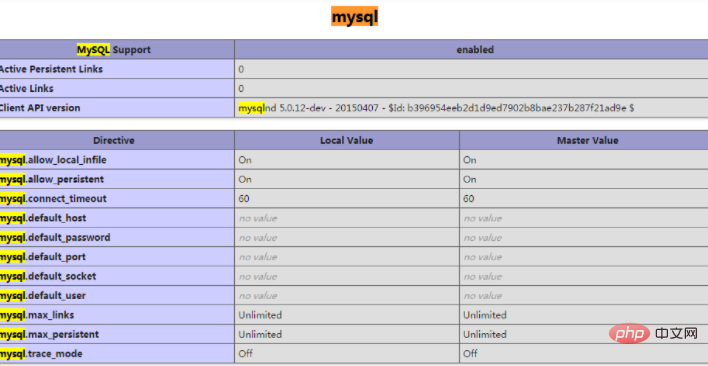
最后修改php.ini配置文件,增加一行:
extension = "mysql.so"
重新启动php-fpm服务就能在phpinfo里看到MySQL扩展了:
–本配置完。
推荐学习:《PHP视频教程》
以上就是yum php7.1怎么增加扩展的详细内容,更多请关注模板之家(www.mb5.com.cn)其它相关文章!



