设置方法:1、利用align属性,语法“<td align="center">...</td>”;2、利用style属性添加居中对齐样式,语法“<td style="text-align: center;">...</td>”。

本教程操作环境:windows7系统、HTML5版、Dell G3电脑。
HTML设置td内容居中
1、利用align属性
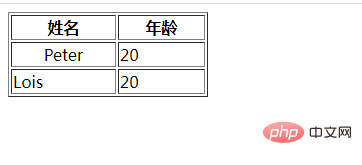
align 属性规定单元格中内容的水平对齐方式。当属性值为“center”,设置居中对齐内容。
<table border="1" width="200">
	<tr>
		<th>姓名</th>
		<th>年龄</th>
	</tr>
	<tr>
		<td align="center">Peter</td>
		<td>20</td>
	</tr>
	<tr>
		<td>Lois</td>
		<td>20</td>
	</tr>
</table>
2、利用style属性添加居中对齐样式
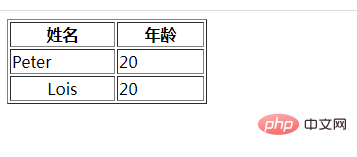
<table border="1" width="200">
	<tr>
		<th>姓名</th>
		<th>年龄</th>
	</tr>
	<tr>
		<td>Peter</td>
		<td>20</td>
	</tr>
	<tr>
		<td style="text-align: center;">Lois</td>
		<td>20</td>
	</tr>
</table>
相关推荐:《html视频教程》
以上就是HTML怎么设置td内容居中的详细内容,更多请关注模板之家(www.mb5.com.cn)其它相关文章!



