React如何构建小程序?下面本篇文章给大家通过1500行代码揭秘React如何运行到小程序平台,介绍一下React 构建小程序两种实现方案,希望对大家有所帮助!
|
React如何构建小程序?下面本篇文章给大家通过1500行代码揭秘React如何运行到小程序平台,介绍一下React 构建小程序两种实现方案,希望对大家有所帮助!
你是否使用过 Taro、Remax 类似的框架?你是否想了解这类框架如何实现 React 代码运行到小程序平台?如果是的话,那么也许你可以花喝一杯咖啡的时间继续往下阅读,本文将通过两种方案实现 React 运行到小程序平台。如果你现在就想阅读这1500行的实现代码,那么可以直接点击项目源码进行获取(也许要多喝几杯咖啡)。 项目描述为了更清晰描述实现过程,我们把实现方案当作一个项目来对待。 import React, { Component } from 'react'
import { View, Text, Button } from '@leo/components'
import './index.css'
export default class Index extends Component {
constructor() {
super()
this.state = { count: 0 }
this.onAddClick = this.onAddClick.bind(this)
this.onReduceClick = this.onReduceClick.bind(this)
}
componentDidMount () {
console.log('执行componentDidMount')
this.setState({ count: 1 })
}
onAddClick() {
this.setState({ count: this.state.count + 1 })
}
onReduceClick() {
this.setState({ count: this.state.count - 1 })
}
render () {
const text = this.state.count % 2 === 0 ? '偶数' : '奇数'
return (
<View className="container">
<View className="conut">
<Text>count: {this.state.count}</Text>
</View>
<View>
<Text className="text">{text}</Text>
</View>
<Button onClick={this.onAddClick} className="btn">+1</Button>
<Button onClick={this.onReduceClick} className="btn">-1</Button>
</View>
)
}

}如果使用过 Taro 或者 Remax 等框架,对上述代码应该有似曾相识的感觉,上述代码正式模仿这类框架的 React DSL 写法。如果想迫切看到实现这个需求的效果,可点击此项目源码进行获取源码,然后根据提示运行项目,即可观察到如下效果:
到这里,就清楚了知道这个项目的需求以及最终实现结果是什么,接下来便是重点阐述从需求点到结果这个过程的具体实现。 实现方案构建小程序框架产物开发过小程序的同学都知道,小程序框架包含主体和页面,其中主体是由三个文件生组成的,且必须放在根目录,这三个文件分别是: ├── src │ ├── app.config.js // 小程序配置文件,用来生成app.json内容 │ └── pages │ └── index │ ├── index.css │ └── index.jsx // React代码,即上述计数器代码 └── tsconfig.json
module.exports = {
  pages: ['pages/index/index'],
  window: {
    navigationBarTitleText: 'react-wxapp',
    navigationBarBackgroundColor: '#282c34'
  }
};
有了这个配置文件,就可以通过如下方式生成 /*outputDir为小程序代码生成目录*/
fs.writeFileSync(path.join(outputDir, './app.js'), `App({})`)
fs.writeFileSync(path.join(outputDir, './app.json'), JSON.stringify(config, undefined, 2)) // config即为app.config.js文件内容小程序页面则是由四种类型文件构成,分别是 React运行到小程序平台方案分析实现React代码运行到小程序平台上主要有两种方式,一种是编译时实现,一种是运行时实现,如果你已经查看的本项目项目源码,就可以发现源码里也体现出了这两种方式(编译时实现目录: 编译时方式主要通过静态编译将 JSX 转换成小程序对应的 template 来实现渲染,类似 Taro1.0 和 2.0,此方式性能接近原生小程序,但是语法却有很大的限制。运行时实现是通过 接下来将分别讲述如何通过编译时和运行时这两种方式来实现 React 运行到小程序平台。 编译时实现在讲述具体实现流程之前,首先需要了解下编译时实现这个名词的概念,首先这里的编译并非传统的高大上“编译”,传统意义上的编译一般将高级语言往低级语言进行编译,但这里只是将同等水平语言转换,即将 为了方便实现将 1. JSX转换成对应小程序的模板 React是通过
语法转换远不止上面这些类型,如果要保证开发者可以使用各种 由于上述需要转换 <view class="container">
<view class="conut"><Text>count: {{count}}</Text></view>
<view>
<text class="text">{{text}}</text>
</view>
<button bindtap="onAddClick" class="btn">+1</button>
<button bindtap="onReduceClick" class="btn">-1</button>
</view>2. 运行时适配 如前文所说,虽然这个方案称为编译时实现,但是要将 小程序 Component({
data: {},
onReady () { this.setData(..) },
handleClick () {}
})而计数器 class CustomComponent extends Component {
state = { }
componentDidMount() { this.setState(..) }
handleClick () { }
}从上面两段代码可以看出,小程序是通过 import React, { Component } from "../../npm/app.js"; // 1.app.js为垫片实现文件
export default class Index extends Component {
static $$events = ["onAddClick", "onReduceClick"]; // 2.收集JSX事件名称
constructor() {
super();
this.state = {
count: 0
};
this.onAddClick = this.onAddClick.bind(this);
this.onReduceClick = this.onReduceClick.bind(this);
}
componentDidMount() {
console.log('执行componentDidMount');
this.setState({
count: 1
});
}
onAddClick() {
this.setState({
count: this.state.count + 1
});
}
onReduceClick() {
this.setState({
count: this.state.count - 1
});
}
createData() { // 3.render函数改为createData,删除
this.__state = arguments[0]; // 原本的JSX代码,返回更新后的state
// 提供给小程序进行setData
const text = this.state.count % 2 === 0 ? '偶数' : '奇数';
Object.assign(this.__state, {
text: text
});
return this.__state;
}
}
Page(require('../../npm/app.js').createPage(Index))。 // 4.使用运行时垫片提供的createPage
// 方法进行初始化
// 方法进行初始化复制代码如上代码,需要处理的地方有4处:
运行时垫片(app.js)实现逻辑如下: export class Component { // 重写Component的实现逻辑
constructor() {
this.state = {}
}
setState(state) { // setState最终触发小程序的setData
update(this.$scope.$component, state)
}
_init(scope) {
this.$scope = scope
}
}
function update($component, state = {}) {
$component.state = Object.assign($component.state, state)
let data = $component.createData(state) // 执行createData获取最新的state
data['$leoCompReady'] = true
$component.state = data
$component.$scope.setData(data) // 将state传递给setData进行更新
}
export function createPage(ComponentClass) { // createPage实现逻辑
const componentInstance = new ComponentClass() // 实例化传入进来React的Class组件
const initData = componentInstance.state
const option = { // 声明一个小程序逻辑的对象字面量
data: initData,
onLoad() {
this.$component = new ComponentClass()
this.$component._init(this)
update(this.$component, this.$component.state)
},
onReady() {
if (typeof this.$component.componentDidMount === 'function') {
this.$component.componentDidMount() // 生命逻辑映射
}
}
}
const events = ComponentClass['$$events'] // 获取React组件内所有事件回调方法名称
if (events) {
events.forEach(eventHandlerName => {
if (option[eventHandlerName]) return
option[eventHandlerName] = function () {
this.$component[eventHandlerName].call(this.$component)
}
})
}
return option
}上文提到了重写
到此,就可以实现 React 代码运行到小程序平台了,可以在项目源码里执行 运行时实现从上文可以看出,编译时实现之所以有语法限制,主要因为其不是让 React 真正运行到小程序平台,而运行时实现方案则可以,其原理是在小程序平台实现一个 React 自定义渲染器,用来渲染 React 代码。这里我们以 remax 框架实现方式来进行讲解,本项目源码中的运行时实现也正是参照 remax 框架实现的。 如果使用过 React 开发过 Web,入口文件有一段类似这样的代码: import React from 'react'
import ReactDom from 'react-dom'
import App from './App'
ReactDom.render(
App,
document.getElementById('root')
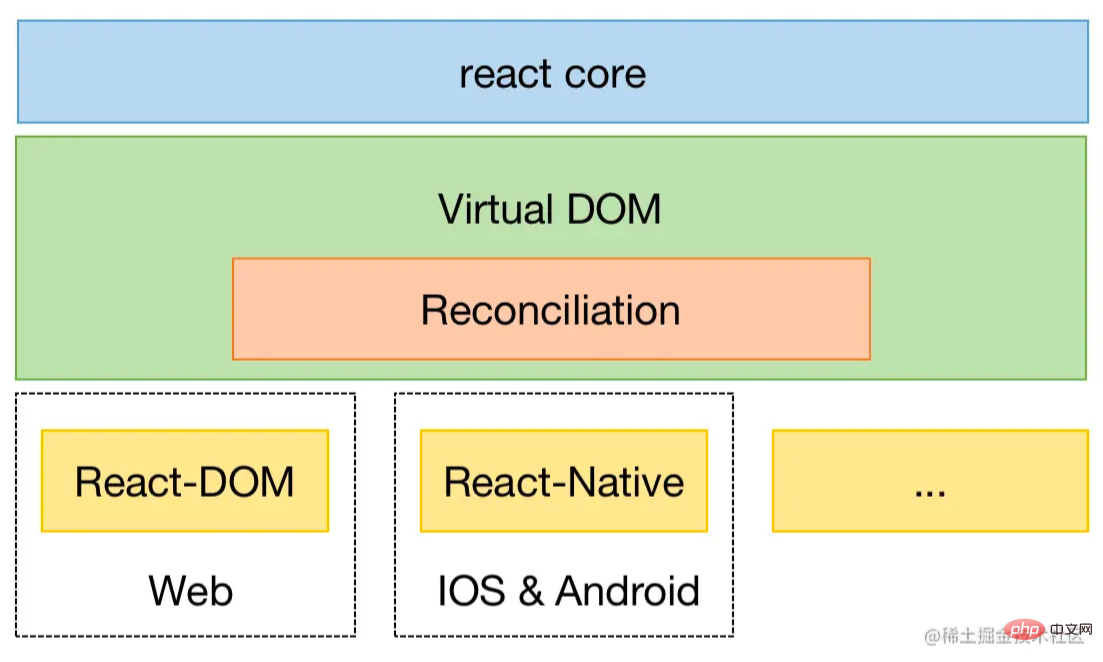
)可以看出渲染 Web 页面需要引用一个叫
而如果要将 React 运行到小程序平台,只需要开发一个小程序自定义渲染器即可。React 官方提供了一个react-reconciler 包专门来实现自定义渲染器,官方提供了一个简单demo重写了 使用 import ReactReconciler from 'react-reconciler'
import hostConfig from './hostConfig' // 宿主配置
// 创建Reconciler实例, 并将HostConfig传递给Reconciler
const ReactReconcilerInst = ReactReconciler(hostConfig)
/**
* 提供一个render方法,类似ReactDom.render方法
* 与ReactDOM一样,接收三个参数
* render(<MyComponent />, container, () => console.log('rendered'))
*/
export function render(element, container, callback) {
// 创建根容器
if (!container._rootContainer) {
container._rootContainer = ReactReconcilerInst.createContainer(container, false);
}
// 更新根容器
return ReactReconcilerInst.updateContainer(element, container._rootContainer, null, callback);
}第二步,如上图引用的 interface VNode {
id: number; // 节点 id,这是一个自增的唯一 id,用于标识节点。
container: Container; // 类似 ReactDOM.render(<App />, document.getElementById('root') 中的第二个参数
children: VNode[]; // 子节点。
type: string | symbol; // 节点的类型,也就是小程序中的基础组件,如:view、text等等。
props?: any; // 节点的属性。
parent: VNode | null; // 父节点
text?: string; // 文本节点上的文字
appendChild(node: VNode): void;
removeChild(node: VNode): void;
insertBefore(newNode: VNode, referenceNode: VNode): void;
...
}
// 实现宿主配置
const hostConfig = {
...
// reconciler提交后执行,触发容器更新数据(实际会触发小程序的setData)
resetAfterCommit: (container) => {
container.applyUpdate();
},
// 创建宿主组件实例,初始化VNode节点
createInstance(type, newProps, container) {
const id = generate();
const node = new VNode({ ... });
return node;
},
// 插入节点
appendChild(parent, child) {
parent.appendChild(child);
},
//
insertBefore(parent, child, beforeChild) {
parent.insertBefore(child, beforeChild);
},
// 移除节点
removeChild(parent, child) {
parent.removeChild(child);
}
...
};除了上面的配置内容,还需要提供一个容器用来将 class Container {
constructor(context) {
this.root = new VNode({..}); // 根节点
}
toJson(nodes ,data) { // 将VNode数据格式化JSON
const json = data || []
nodes.forEach(node => {
const nodeData = {
type: node.type,
props: node.props || {},
text: node.text,
id: node.id,
children: []
}
if (node.children) {
this.toJson(node.children, nodeData.children)
}
json.push(nodeData)
})
return json
}
applyUpdate() { // 供HostConfig配置的resetAfterCommit方法执行
const root = this.toJson([this.root])[0]
console.log(root)
this.context.setData({ root});
}
...
}紧接着,我们封装一个 import * as React from 'react';
import Container from './container'; // 上文定义的Container
import render from './render'; // 上文定义的render方法
export default function createPageConfig(component) { // component为React组件
const config = { // 小程序逻辑对象字面量,供Page方法注册
data: {
root: {
children: [],
}
},
onLoad() {
this.container = new Container(this, 'root');
const pageElement = React.createElement(component, {
page: this,
});
this.element = render(pageElement, this.container);
}
};
return config;
}到这里,基本已经实现完小程序渲染器了,为了使代码跑起来,还需要通过静态编译改造下 React 计数器组件,其实就是在末尾插入一句代码: import React, { Component } from 'react';
export default class Index extends Component {
constructor() {
super();
this.state = {
count: 0
};
this.onAddClick = this.onAddClick.bind(this);
this.onReduceClick = this.onReduceClick.bind(this);
}
...
}
// app.js封装了上述createPage方法
Page(require('../../npm/app.js').createPage(Index))通过这样,就可以使得React代码在小程序真正运行起来了,但是这里我们还有个流程没介绍,上述 // 篇幅问题,这里只贴部分数据
{
"type": "root",
"props": {},
"id": 0,
"children": [{
"type": "view",
"props": {
"class": "container"
},
"id": 12,
"children": [{
"type": "view",
"props": {
"class": "conut"
},
"id": 4,
"children": [{
"type": "text",
"props": {},
"id": 3,
"children": [{
"type": "plain-text",
"props": {},
"text": "count: ",
"id": 1,
"children": []
}, {
"type": "plain-text",
"props": {},
"text": "1",
"id": 2,
"children": []
}]
}]
}
...
...
}]
}可以看出 <template is="TPL" data="{{root: root}}" /> <!-- root为上述的JSON数据 -->
<template name="TPL">
<block wx:for="{{root.children}}" wx:key="id">
<template is="TPL_1_CONTAINER" data="{{i: item, a: ''}}" />
</block>
</template>
<template name="TPL_1_view">
<view
style="{{i.props.style}}"
class="{{i.props.class}}"
bindtap="{{i.props.bindtap}}"
>
<block wx:for="{{i.children}}" wx:key="id">
<template is="{{'TPL_' + (tid + 1) + '_CONTAINER'}}" data="{{i: item, a: a, tid: tid + 1 }}" />
</block>
</view>
</template>
<template name="TPL_2_view">
<view
style="{{i.props.style}}"
class="{{i.props.class}}"
bindtap="{{i.props.bindtap}}"
>
<block wx:for="{{i.children}}" wx:key="id">
<template is="{{'TPL_' + (tid + 1) + '_CONTAINER'}}" data="{{i: item, a: a, tid: tid + 1 }}" />
</block>
</view>
</template>
<template name="TPL_3_view">
<view
style="{{i.props.style}}"
class="{{i.props.class}}"
bindtap="{{i.props.bindtap}}"
>
<block wx:for="{{i.children}}" wx:key="id">
<template is="{{'TPL_' + (tid + 1) + '_CONTAINER'}}" data="{{i: item, a: a, tid: tid + 1 }}" />
</block>
</view>
</template>
...
...至此,就可以真正实现 React 代码运行到小程序了,可以在项目源码里执行 总结本文以最简实现方式讲述了 React 构建小程序两种实现方案,这两种方案优缺点分明,都有各自的优势,对于追求性能好场的场景,编译时方案更为合适。对于着重开发体验且对性能要求不高的场景,运行时方案为首选。如果想了解更多源码实现,可以去看下 Taro、Remax 官方源码,欢迎互相讨论。 项目地址
【相关学习推荐:小程序开发教程】 以上就是React如何构建小程序?两种实现方案分享的详细内容,更多请关注模板之家(www.mb5.com.cn)其它相关文章! |