本篇文章给大家分享教你玩转php中laravel框架的学习(分享)有一定的参考价值,有需要的朋友可以参考一下,希望对大家有所帮助。
关于laravel的介绍就不讲了,总之laravel是款比较强大的框架,它是国外框架所以在安装的上面可能比较麻烦。
laravel的安装
首先安装laravel之前要安装composer,如果是linux系统即可直接下载安装,下载完后不能安装记得修改下文件权限用命令chmod,这边主要讲下window下如何使用composer这个工具。 composer config -g repositories.packagist composer http://packagist.phpcomposer.com这条命令,运行cmd在命令行运行上面的命令,就可以下载composer工具,下载成功后可以看到composer文件底下有个composer.json文件这是一个配置文件,打开配置文件写明php版本信息和要下载的laravel信息,格式如下:
     {
    "name": "laravel/laravel",
    "description": "The Laravel Framework.",
    "keywords": ["framework", "laravel"],
    "license": "MIT",
    "type": "project",
    "require": {
        "php": ">=5.5.9",
        "laravel/framework": "5.1.*"
    },
    "require-dev": {
        "fzaninotto/faker": "~1.4",
        "mockery/mockery": "0.9.*",
        "phpunit/phpunit": "~4.0",
        "phpspec/phpspec": "~2.1"
    },
    "autoload": {
        "classmap": [
            "database"
        ],
        "psr-4": {
            "App\\": "app/"
        }
    },
    "autoload-dev": {
        "classmap": [
            "tests/TestCase.php"
        ]
    },
    "scripts": {
        "post-install-cmd": [
            "php artisan clear-compiled",
            "php artisan optimize"
        ],
        "pre-update-cmd": [
            "php artisan clear-compiled"
        ],
        "post-update-cmd": [
            "php artisan optimize"
        ],
        "post-root-package-install": [
            "php -r \"copy('.env.example', '.env');\""
        ],
        "post-create-project-cmd": [
            "php artisan key:generate"
        ]
    },
    "config": {
        "preferred-install": "dist"
    },
    "repositories": [
        {"type": "composer", "url": "http://packagist.phpcomposer.com"},
        {"packagist": false}
    ]
}
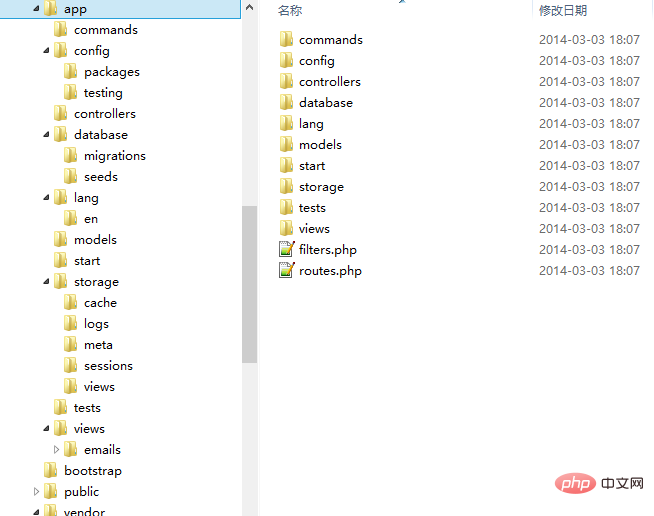
配置好之后输入composer install 进行安装laravel,这边要比较注意的是安装目录的路径问题,如果你想安装在d盘底下就在把命令行切到d目录底下进行安装(在此操作之前要配置好环境变量)。 laravel的目录结构介绍 laravel是怎么运行的 laravel数据库配置
这边用到的是mysql,进行了简单的配置
'mysql' => array(
'driver'    => 'mysql',
'host'      => 'localhost',
'database'  => 'oss',
'username'  => 'root',
'password'  => '',
'charset'   => 'utf8',
'collation' => 'utf8_unicode_ci',
'prefix'    => '',
)
laravel的数据库使用 <?php
use Illuminate\Auth\UserTrait;
use Illuminate\Auth\UserInterface;
use Illuminate\Auth\Reminders\RemindableTrait;
use Illuminate\Auth\Reminders\RemindableInterface;
class User extends Eloquent implements UserInterface, RemindableInterface {
use UserTrait, RemindableTrait;
/**
* The database table used by the model.
*
* @var string
*/
protected $table = 'users';
/**
* The attributes excluded from the model's JSON form.
*
* @var array
*/
protected $hidden = array('password', 'remember_token');
} 即可以直接使用 User ::all() 查询所有结果 ,User::find(2)查询一个,Post::findOrFail(2) 如果没找到就会返回错误,Post::save()、Post::where()->find()、Post::add()、Post::delete()
数据库的简便操作: DB::table(‘tablename’)->insert([
        插入多个时要再加一个数组
        ['title'=>'title','name'=>'name']
        ['title'=>'title']
        ['title'=>'title']
        ])

        插入时要想得到ID
        DB::table('tablename')->insertGetId(['title'=>'titles'])

        更新数据要有ID
        DB::table('tablename')->where('id',1)->update(['title'=>'titles'])

        删除数据
        DB::table('tablename')->where('id',1)->delete();

        查询数据
        DB::table('tablename')->get();  得到全部的值
        DB::table('tablename')->get(['title']); 只查询title的值
        DB::table('tablename')->first();  只拿第一个
        DB::table('tablename')->orderBy('id','desc')->first(); 根据id排序
        DB::table('tablename')->where('id','!=',2)->get(); 不等于2
        DB::table('tablename')->where('id','!=',2)->where('id','>',5)->get(); 可以使用多个where
        DB::table('tablename')->where('id','!=',2)->OrWhere('id','>',5)->get(); 或者
        DB::table('tablename')->whereBetween('id',[2,5])->get();  闭包之间
        DB::table('tablename')->whereIn('id',[2,5,9])->get();
        DB::table('tablename')->whereNotIn('id',[2,5,9])->get();
        DB::table('tablename')->whereNull('id')->get();  为空的话就可以查询出来
        DB::table('tablename')->take(3)->get();  只查询3个
        DB::table('tablename')->limit(3)->get();  只查询3个
        DB::table('tablename')->skip(2)->take(3)->get();  只查询3个跳过第二个
        DB::table('tablename')->where('id','!=',2)->pluck('title'); 只返回它的title
        DB::table('tablename')->count();  有多少条记录
        DB::table('tablename')->max('id');
        DB::table('tablename')->min('id');
        DB::table('tablename')->avg('id');
        DB::table('tablename')->sum('id');
多表关联 public function comment(){ return $this->hasMany('Comment','post_id') } 正向关联 一对多 一对一是hasOne public function post(){ return $this->belongsTo('Post','post_id') } 反向关联
取得关联值
                Post::find(2)->comment  就可以得到Comment这张表的内容   //这样查询一个是可以的  查询多个就要设置预载入
            查询多个
                Post::with('comment')->get();
                Post::with(['comment'=>function($query){$query->where('id','>',2)}])->get();  加条件
推荐学习:《PHP视频教程》
以上就是教你玩转php中laravel框架(分享)的详细内容,更多请关注模板之家(www.mb5.com.cn)其它相关文章!