在html中,可以通过在水平线标签中,使用style属性添加外边距样式来设置水平线与文字的距离。而外边距样式可以使用margin、margin-top或margin-bottom属性来设置。

本教程操作环境:windows7系统、CSS3&&HTML5版、Dell G3电脑。 html设置水平线与文字的距离 <div>
文字--没有设置距离
<hr/>
文字
</div>
<div>
文字
<hr style="margin-top: 20px"/>
文字
</div>
<div>
文字
<hr style="margin-bottom: 20px"/>
文字
</div>
<div>
文字
<hr style="margin: 20px 0 30px;"/>
文字
</div> 效果图:
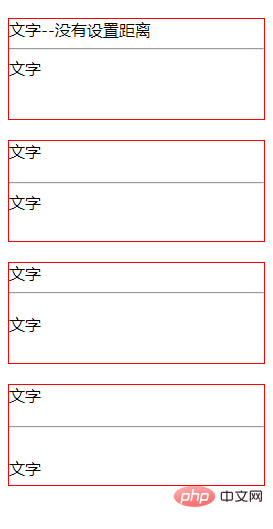
说明: 1、margin属性 margin简写属性在一个声明中设置所有外边距属性。该属性可以有1到4个值。 实例:
margin:10px 5px 15px 20px; 上边距是 10px 右边距是 5px 下边距是 15px 左边距是 20px
margin:10px 5px 15px; 上边距是 10px 右边距和左边距是 5px 下边距是 15px
margin:10px 5px; 上边距和下边距是 10px 右边距和左边距是 5px
margin:10px; 2、使用margin-top、margin-bottom属性 margin-top:设置元素的上外边距
margin-bottom:设置元素的下外边距
(学习视频分享:css视频教程) 以上就是html怎么设置水平线与文字的距离的详细内容,更多请关注模板之家(www.mb5.com.cn)其它相关文章! |



