css设置悬浮效果的方法:首先给元素添加“position: fixed;”样式,固定元素的位置,让元素悬浮在页面中,不随浏览器窗口的滚动条滚动而变化;然后使用top、bottom、left、right属性设置元素的悬浮位置即可。
本教程操作环境:windows7系统、CSS3&&HTML5版、Dell G3电脑。 css设置悬浮效果(固定位置) <!DOCTYPE html>
<html>
<head>
<meta charset="utf-8" />
<meta http-equiv="X-UA-Compatible" content="IE=edge,chrome=1" />
<title>DIV悬浮示例-纯CSS实现</title>
<style type="text/css">
/*设置了高度,可以上下滚动*/
body {
height: 1800px;
background: #dddddd;
}
/*div通用样式*/
div {
background: #1a59b7;
color: #ffffff;
overflow: hidden;
z-index: 9999;
position: fixed; /*DIV悬浮(固定位置)*/
padding: 5px;
text-align: center;
width: 175px;
height: 22px;
border-bottom-left-radius: 4px;
border-bottom-right-radius: 4px;
border-top-left-radius: 4px;
border-top-right-radius: 4px;
}
/*右上角*/
div.right_top {
right: 10px;
top: 10px;
}
/*右下角*/
div.right_bottom {
right: 10px;
bottom: 10px;
}
/*屏幕中间*/
div.center_ {
right: 45%;
top: 50%;
}
/*左上角*/
div.left_top {
left: 10px;
top: 10px;
}
/*左下角*/
div.left_bottom {
left: 10px;
bottom: 10px;
}
</style>
</head>
<body>
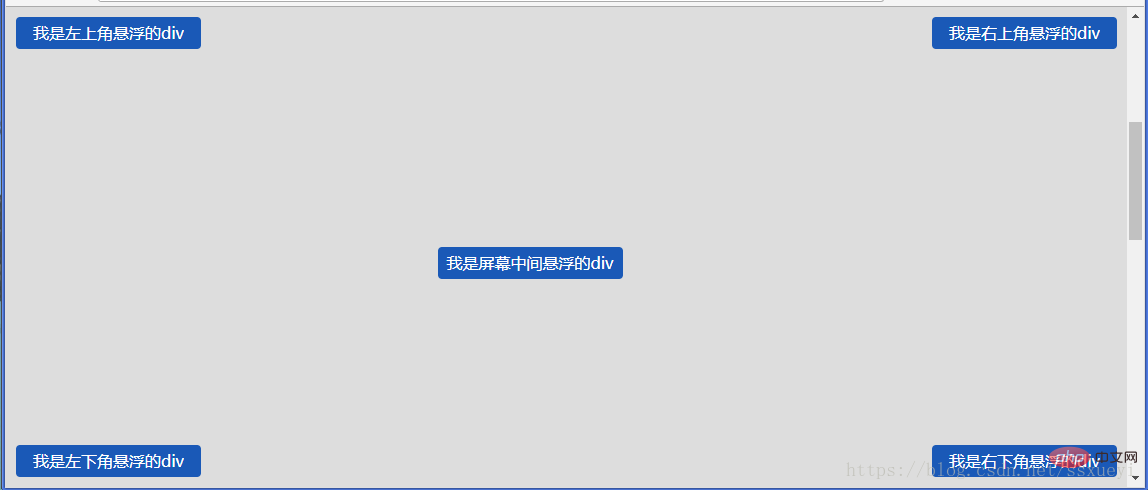
<div class="right_top"> 我是右上角悬浮的div</div>
<div class="right_bottom"> 我是右下角悬浮的div</div>
<div class="center_"> 我是屏幕中间悬浮的div</div>
<div class="left_top"> 我是左上角悬浮的div</div>
<div class="left_bottom"> 我是左下角悬浮的div</div>
</body>
</html>效果图:
(学习视频分享:css视频教程) 以上就是css怎么设置悬浮效果的详细内容,更多请关注模板之家(www.mb5.com.cn)其它相关文章! |



