oracle数据库基本语句:1、创建数据库;2、删除数据库;3、备份数据库;4、数据库还原;5、重命名表;6、修改字段;7、删除索引等等。

本教程操作环境:windows7系统、oracle版,DELL G3电脑。 oracle数据库基本语句: 一、Oracle数据库操作 1、创建数据库 create database databasename 2、删除数据库 drop database dbname 3、备份数据库 完全备份 exp demo/demo@orcl buffer=1024 file=d:back.dmp full=y 将数据库中system用户与sys用户的表导出 exp demo/demo@orcl file=d:backup1.dmp owner=(system,sys) 导出指定的表 exp demo/demo@orcl file=d:backup2.dmp tables=(teachers,students) 按过滤条件,导出 exp demo/demo@orcl file=d:back.dmp tables=(table1) query=" where filed1 like 'fg%'" 导出时可以进行压缩;命令后面 加上 compress=y ;如果需要日志,后面: log=d:log.txt 备份远程服务器的数据库 exp 用户名/密码@远程的IP:端口/实例 file=存放的位置:文件名称.dmp full=y 4、数据库还原 打开cmd直接执行如下命令,不用再登陆sqlplus。 完整还原 imp demo/demo@orcl file=d:back.dmp full=y ignore=y log=D:implog.txt 指定log很重要,便于分析错误进行补救。 导入指定表 imp demo/demo@orcl file=d:backup2.dmp tables=(teachers,students) 还原到远程服务器 imp 用户名/密码@远程的IP:端口/实例 file=存放的位置:文件名称.dmp full=y 二、Oracle表操作 1、创建表 create table tabname(col1 type1 [not null] [primary key],col2 type2 [not null],..) 根据已有的表创建新表: A: select * into table_new from table_old (使用旧表创建新表) B: create table tab_new as select col1,col2… from tab_old definition only<仅适用于Oracle> 2、删除表 drop table tabname 3、重命名表 说明:alter table 表名 rename to 新表名 eg: alter table tablename rename to newtablename 4、增加字段 说明:alter table 表名 add (字段名 字段类型 默认值 是否为空); 例: alter table tablename add (ID int); alter table tablename add (ID varchar2(30) default '空' not null); 5、修改字段 说明:alter table 表名 modify (字段名 字段类型 默认值 是否为空); eg: alter table tablename modify (ID number(4)); 6、重名字段 说明:alter table 表名 rename column 列名 to 新列名 (其中:column是关键字) eg: alter table tablename rename column ID to newID; 7、删除字段 说明:alter table 表名 drop column 字段名; eg: alter table tablename drop column ID; 8、添加主键 alter table tabname add primary key(col) 9、删除主键 alter table tabname drop primary key(col) 10、创建索引 create [unique] index idxname on tabname(col….) 11、删除索引 drop index idxname 注:索引是不可更改的,想更改必须删除重新建。 12、创建视图 create view viewname as select statement 13、删除视图 drop view viewname 三、Oracle操作数据 1、数据查询 select <列名> from <表名> [where <查询条件表达试>] [order by <排序的列名>[asc或desc]] 2、插入数据 insert into 表名 values(所有列的值);
insert into test values(1,'zhangsan',20); insert into 表名(列) values(对应的值);
insert into test(id,name) values(2,'lisi'); 3、更新数据 update 表 set 列=新的值 [where 条件] -->更新满足条件的记录
update test set name='zhangsan2' where name='zhangsan' update 表 set 列=新的值 -->更新所有的数据
update test set age =20; 4、删除数据 delete from 表名 where 条件 -->删除满足条件的记录
delete from test where id = 1; delete from test -->删除所有 commit; -->提交数据 rollback; -->回滚数据
delete方式可以恢复删除的数据,但是提交了,就没办法了 delete删除的时候,会记录日志 -->删除会很慢很慢 truncate table 表名 删除所有数据,不会影响表结构,不会记录日志,数据不能恢复 -->删除很快 drop table 表名 删除所有数据,包括表结构一并删除,不会记录日志,数据不能恢复-->删除很快 5、数据复制 表数据复制 insert into table1 (select * from table2); 复制表结构 create table table1 select * from table2 where 1>1; 复制表结构和数据 create table table1 select * from table2; 复制指定字段 create table table1 as select id, name from table2 where 1>1; 四、数据库复制命令 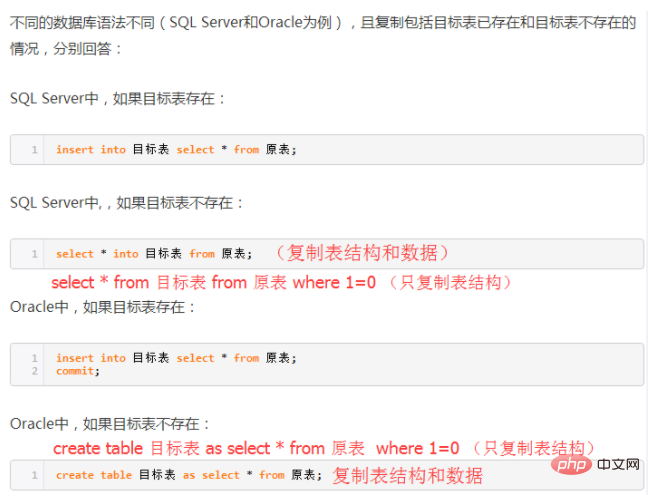
推荐(免费):oracle
以上就是oracle数据库基本语句有哪些的详细内容,更多请关注模板之家(www.mb5.com.cn)其它相关文章! |



