 相关推荐:《angular教程》 一,结构型指令 *是一个语法糖,<a *ngIf="user.login">退出</a>相当于 <ng-template [ngIf]="user.login">
<a>退出</a>
</ng-template> 避免了写ng-template。 <ng-template [ngIf]="item.reminder">
<mat-icon >
alarm
</mat-icon>
</ng-template>
<!-- <mat-icon *ngIf="item.reminder">
alarm
</mat-icon> -->结构型指令为什么能改变结构? ngIf源码 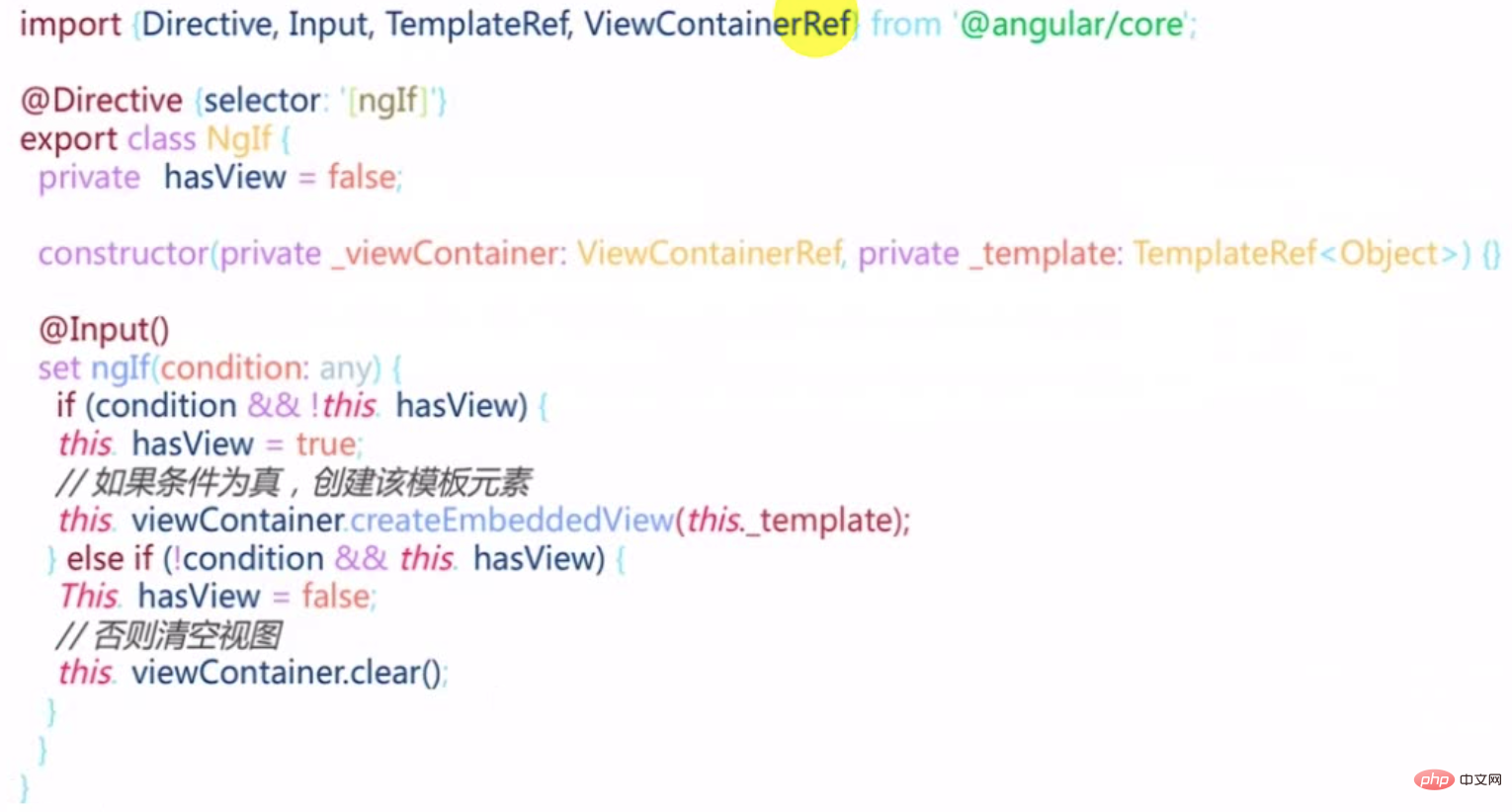
set方法标记为@Input,如果条件为真而且不含view的话,把内部hasView标识位置为true然后通过viewContainer根据template创建一个子view。 条件不为真就用视图容器清空所含内容。 viewContainerRef:容器,指令所在的视图的容器 二,模块Module 什么是模块?独立功能的文件集合,用来组织文件。 模块元数据 entryComponents:进入模块就要立刻加载的(比如对话框),而不是调用的时候加载。 exports:模块内部的想要让大家公用,一定要export出来。 forRoot()是什么? imports: [RouterModule.forRoot(routes)], imports: [RouterModule.forChild(route)]; 其实forRoot和forChild是两个静态工厂方法。 constructor(guard: any, router: Router);
/**
* Creates a module with all the router providers and directives. It also optionally sets up an
* application listener to perform an initial navigation.
*
* Options (see `ExtraOptions`):
* * `enableTracing` makes the router log all its internal events to the console.
* * `useHash` enables the location strategy that uses the URL fragment instead of the history
* API.
* * `initialNavigation` disables the initial navigation.
* * `errorHandler` provides a custom error handler.
* * `preloadingStrategy` configures a preloading strategy (see `PreloadAllModules`).
* * `onSameUrlNavigation` configures how the router handles navigation to the current URL. See
* `ExtraOptions` for more details.
* * `paramsInheritanceStrategy` defines how the router merges params, data and resolved data
* from parent to child routes.
*/
static forRoot(routes: Routes, config?: ExtraOptions): ModuleWithProviders<RouterModule>;
/**
* Creates a module with all the router directives and a provider registering routes.
*/
static forChild(routes: Routes): ModuleWithProviders<RouterModule>;
}元数据根据不同情况会变化,元数据没办法动态指定,不写元数据,直接构造一个静态的工程方法,返回一个Module。 写一个forRoot()创建一个serviceModule:$ ng g m services import { NgModule } from '@angular/core';
import { CommonModule } from '@angular/common';
@NgModule({
declarations: [],
imports: [
CommonModule
]
})
export class ServicesModule { }ServiceModule里面的元数据不要了。用一个静态方法forRoot返回。 import { NgModule, ModuleWithProviders } from '@angular/core';
import { CommonModule } from '@angular/common';
@NgModule()
export class ServicesModule {
static forRoot(): ModuleWithProviders{
return {
ngModule: ServicesModule,
providers:[]
}
}
}在core Module中导入的时候使用 imports: [ServicesModule.forRoot();] 三,风格定义 ngClass,ngStyle和[class.yourclass] ngClass:用于条件动态指定样式类,适合对样式做大量更改的情况。预先定义好class。 <mat-list-item class="container" [@item]="widerPriority" [ngClass]="{
'priority-normal':item.priority===3,
'priority-important':item.priority===2,
'priority-emergency':item.priority===1
}"<div class="content" mat-line [ngClass]="{'completed':item.completed}">
<span [matTooltip]="item.desc">{{item.desc}}</span>
</div>ngStyle:用于条件动态指定样式,适合少量更改的情况。比如下面例子中[ngStyle]="{'order':list.order}"。key是一个字符串。 [class.yourclass] :[class.yourclass] = "condition"直接对应一个条件。这个condition满足适合应用这个class。等价于ngClass的写法,相当于是ngClass的变体,简写。 <div class="content" mat-line [class.completed]="item.completed">
<span [matTooltip]="item.desc">{{item.desc}}</span>
</div>1,使用ngStyle在拖拽的时候调整顺序。 原理就是动态指定flex容器样式的order为list模型对象里的order。 1、在taskHome中给app-task-list添加orderlist-container是一个flex容器,它的排列顺序是按照order去排序的。 <app-task-list *ngFor="let list of lists"
class="list-container"
app-droppable="true"
[dropTags]="['task-item','task-list']"
[dragEnterClass]=" 'drag-enter' "
[app-draggable]="true"
[dragTag]=" 'task-list' "
[draggedClass]=" 'drag-start' "
[dragData]="list"
(dropped)="handleMove($event,list)"
[ngStyle]="{'order': list.order}"
>2、list数据结构里需要有order,所以增加order属性lists = [
{
id: 1,
name: "待办",
order: 1,
tasks: [
{
id: 1,
desc: "任务一: 去星巴克买咖啡",
completed: true,
priority: 3,
owner: {
id: 1,
name: "张三",
avatar: "avatars:svg-11"
},
dueDate: new Date(),
reminder: new Date()
},
{
id: 2,
desc: "任务一: 完成老板布置的PPT作业",
completed: false,
priority: 2,
owner: {
id: 2,
name: "李四",
avatar: "avatars:svg-12"
},
dueDate: new Date()
}
]
},
{
id: 2,
name: "进行中",
order:2,
tasks: [
{
id: 1,
desc: "任务三: 项目代码评审",
completed: false,
priority: 1,
owner: {
id: 1,
name: "王五",
avatar: "avatars:svg-13"
},
dueDate: new Date()
},
{
id: 2,
desc: "任务一: 制定项目计划",
completed: false,
priority: 2,
owner: {
id: 2,
name: "李四",
avatar: "avatars:svg-12"
},
dueDate: new Date()
}
]
}
];3、在list拖拽换顺序的时候,改变order交换两个srcList和目标list的顺序order handleMove(srcData,targetList){
switch (srcData.tag) {
case 'task-item':
console.log('handling item');
break;
case 'task-list':
console.log('handling list');
const srcList = srcData.data;
const tempOrder = srcList.order;
srcList.order = targetList.order;
targetList.order = tempOrder;
default:
break;
}
}更多编程相关知识,请访问:编程视频!! 以上就是详解Angular中的结构型指令、模块和样式的详细内容,更多请关注模板之家(www.mb5.com.cn)其它相关文章! |



