css在input中插图片的方法:首先在包含input的div中设置子元素;然后设置外层div定位为relative;接着设置span定位为absolute;最后给input添加margin-left属性即可。
本教程操作环境:windows7系统、HTML5&&CSS3版本、Dell G3电脑。 推荐:css视频教程 css在input里插图片 1、在包含input的div中设置子元素<span> <div class="search">
<span></span>
<input type="text">
</div>2、设置外层div定位为relative .search{
position: relative;
}3、设置span定位为absolute,并设置宽高和背景图片 .search > span{
position: absolute;
display: inline-block;
width: 20px;
height: 20px;
background: url(./search.png) no-repeat;
background-size: 80% 80%;
background-position: center;
}4、给input添加margin-left属性。 .search > input{
width: 100%;
padding-left: 20px;
}5、效果图 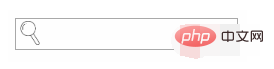
以上就是css怎么在input中插图片的详细内容,更多请关注模板之家(www.mb5.com.cn)其它相关文章! |



