介绍Centos安装PHP7及配置php-fpm开机启动,php-7.2.11的步骤在官网下载php-7.2.11的php压缩包,centos 7 安装 php-7.2.11的步骤..
|
推荐(免费):PHP7 cd /usr/local/src wget -c http://cn2.php.net/distributions/php-7.2.11.tar.gz
tar -xzvf php-7.2.11.tar.gz
cd php-7.2.11
yum -y install libxml2
yum -y install libxml2-devel
yum -y install openssl
yum -y install openssl-devel
yum -y install curl-devel
yum -y install libjpeg-devel
yum -y install libpng-devel
yum -y install freetype-devel
yum -y install bzip2-devel
yum -y install libmcrypt libmcrypt-devel
yum -y install postgresql-devel
yum -y install aspell-devel
yum -y install readline-devel
yum -y install libxslt-devel
yum -y install net-snmp-devel
yum -y install unixODBC-devel
yum -y install libicu-devel
yum -y install libc-client-devel
yum -y install libXpm-devel
yum -y install libvpx-devel
yum -y install enchant-devel
yum -y install openldap
yum -y install openldap-devel
yum -y install db4-devel
yum -y install gmp-devel
yum -y install sqlite-devel
yum -y install mysql-devel
yum install oniguruma-devel -y
php 安装配置 请根据以下 A B C 选择合适的一项进行安装配置 A. PHP 7.2.10 单选模式
B. PHP 7.2.10 多行模式 ./configure \ --prefix=/usr/local/php \ --with-config-file-path=/usr/local/php/etc \ --enable-fpm \ --with-fpm-user=nginx \ --with-fpm-group=nginx \ --enable-inline-optimization \ --disable-debug \ --disable-rpath \ --enable-shared \ --enable-soap \ --with-xmlrpc \ --with-openssl \ --with-mcrypt \ --with-pcre-regex \ --with-sqlite3 \ --with-zlib \ --enable-bcmath \ --with-iconv \ --with-bz2 \ --enable-calendar \ --with-curl \ --with-cdb \ --enable-dom \ --enable-exif \ --enable-fileinfo \ --enable-filter \ --with-pcre-dir \ --enable-ftp \ --with-gd \ --with-openssl-dir \ --with-jpeg-dir \ --with-png-dir \ --with-freetype-dir \ --enable-gd-native-ttf \ --enable-gd-jis-conv \ --with-gettext \ --with-gmp \ --with-mhash \ --enable-json \ --enable-mbstring \ --enable-mbregex \ --enable-mbregex-backtrack \ --with-libmbfl \ --with-onig \ --enable-pdo \ --with-mysqli=mysqlnd \ --with-pdo-mysql=mysqlnd \ --with-zlib-dir \ --with-pdo-sqlite \ --with-readline \ --enable-session \ --enable-shmop \ --enable-simplexml \ --enable-sockets \ --enable-sysvmsg \ --enable-sysvsem \ --enable-sysvshm \ --enable-wddx \ --with-libxml-dir \ --with-xsl \ --enable-zip \ --enable-mysqlnd-compression-support \ --with-pear \ --enable-opcache C. PHP 7.4.10 ./configure \ --prefix=/usr/local/php \ --with-config-file-path=/usr/local/php/etc \ --enable-fpm \ --with-fpm-user=nginx \ --with-fpm-group=nginx \ --enable-inline-optimization \ --disable-debug \ --disable-rpath \ --enable-shared \ --enable-soap \ --with-xmlrpc \ --with-openssl \ --with-mcrypt \ --with-pcre-regex \ --with-sqlite3 \ --with-zlib \ --enable-bcmath \ --with-iconv \ --with-kerberos \ --with-libdir=lib64 \ --with-bz2 \ --enable-calendar \ --with-curl \ --with-cdb \ --enable-dom \ --enable-exif \ --enable-fileinfo \ --enable-filter \ --with-pcre-dir \ --enable-ftp \ --enable-gd \ --with-openssl-dir \ --with-jpeg-dir \ --with-png-dir \ --with-freetype-dir \ --enable-gd-native-ttf \ --enable-gd-jis-conv \ --with-gettext \ --with-gmp \ --with-mhash \ --enable-json \ --enable-mbstring \ --enable-mbregex \ --enable-mbregex-backtrack \ --with-libmbfl \ --with-onig \ --enable-pdo \ --with-mysqli=mysqlnd \ --with-pdo-mysql=mysqlnd \ --with-zlib-dir \ --with-pdo-sqlite \ --with-readline \ --enable-session \ --enable-shmop \ --enable-simplexml \ --enable-sockets \ --enable-sysvmsg \ --enable-sysvsem \ --enable-sysvshm \ --enable-wddx \ --with-libxml-dir \ --with-xsl \ --with-zip \ --enable-xml \ --enable-mysqlnd-compression-support \ --with-pear \ --enable-opcache \ --enable-pcntl 从 PHP 7.4.0 开始,必须在编译 PHP 时用 --with-zip 配置选项来提供 zip 支持。之前的 PHP 版本,需要使用 --enable-zip 选项。
make && make install
/usr/local/php/bin/php -v
/usr/local/php/sbin/php-fpm
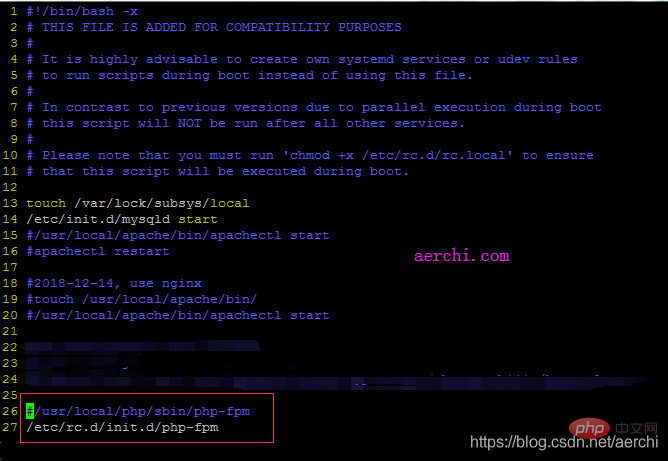
在centos7中编译安装好php后,系统重启后并不会对php进行开机启动,所以需要对centos7添加开机启动脚本对php进行开机启动服务。
手动启动:
开机自动启动:
安装后要进行的操作: 1. 把安装目录下的 php.ini-development 复制到 /etc/ 目录下 2. 修改 /usr/local/php/etc/php-fpm.conf.default 名为 php-fpm.conf 并进入修改 3. 修改 /usr/local/php/etc/php-fpm.d/www.conf.default 为 www.conf 并进入修改 PHP 7.4.10 安装 ZIP 1 扩展包 wget https://pecl.php.net/get/zip-1.19.0.tgz 2 解压 并进入 tar -zxvf zip-1.19.0.tgz 2.2 cd zip-1.19.0 3 /usr/local/php/bin/phpize 4 ./configure --with-php-config=/usr/local/php/bin/php-config 自己的php目录 5 make && make install --------------------- 然后下载最新的,解压 wget https://libzip.org/download/libzip-1.5.2.tar.gz tar -zxvf libzip-1.5.2.tar.gz 这时发现还要安装cmake,再去下载cmake: wget https://github.com/Kitware/CMake/releases/download/v3.15.4/cmake-3.15.4.tar.gz 解压: tar -zxvf cmake-3.15.4.tar.gz 注意:cmake要按照文档安装 ./bootstrap && make && sudo make install 漫长的等待,安装完成后,执行 cmake -version 出现版本号即表示cmake安装成功。 接下来, 再进入 cd libzip-1.5.2 mkdir build && cd build/ cmake -DCMAKE_INSTALL_PREFIX=/usr/local/libzip .. make make install //检测libzip是否安装成功 whereis libzip libzip: /usr/local/libzip
在Linux中将php-fpm配置成服务的方法 PHP 源文件路径: /usr/local/src/php-7.2.11/ 1. 配置 php-fpm.conf vim /usr/local/php/etc/php-fpm.conf php-fpm.pid 目录必须指向:/usr/local/php/var/run/php-fpm.pid 2. 拷贝php-fpm脚本至/etc/init.d目录 cp /usr/local/src/php-7.2.11/sapi/fpm/init.d.php-fpm /etc/init.d/php-fpm #! /bin/sh
### BEGIN INIT INFO
# Provides: php-fpm
# Required-Start: $remote_fs $network
# Required-Stop: $remote_fs $network
# Default-Start: 2 3 4 5
# Default-Stop: 0 1 6
# Short-Description: starts php-fpm
# Description: starts the PHP FastCGI Process Manager daemon
### END INIT INFO
prefix=/usr/local/php
exec_prefix=${prefix}
php_fpm_BIN=${exec_prefix}/sbin/php-fpm
php_fpm_CONF=${prefix}/etc/php-fpm.conf
php_fpm_PID=${prefix}/var/run/php-fpm.pid
php_opts="--fpm-config $php_fpm_CONF --pid $php_fpm_PID"
wait_for_pid () {
try=0
while test $try -lt 35 ; do
case "$1" in
'created')
if [ -f "$2" ] ; then
try=''
break
fi
;;
'removed')
if [ ! -f "$2" ] ; then
try=''
break
fi
;;
esac
echo -n .
try=`expr $try + 1`
sleep 1
done
}
case "$1" in
start)
echo -n "Starting php-fpm "
$php_fpm_BIN --daemonize $php_opts
if [ "$?" != 0 ] ; then
echo " failed"
exit 1
fi
wait_for_pid created $php_fpm_PID
if [ -n "$try" ] ; then
echo " failed"
exit 1
else
echo " done"
fi
;;
stop)
echo -n "Gracefully shutting down php-fpm "
if [ ! -r $php_fpm_PID ] ; then
echo "warning, no pid file found - php-fpm is not running ?"
exit 1
fi
kill -QUIT `cat $php_fpm_PID`
wait_for_pid removed $php_fpm_PID
if [ -n "$try" ] ; then
echo " failed. Use force-quit"
exit 1
else
echo " done"
fi
;;
status)
if [ ! -r $php_fpm_PID ] ; then
echo "php-fpm is stopped"
exit 0
fi
PID=`cat $php_fpm_PID`
if ps -p $PID | grep -q $PID; then
echo "php-fpm (pid $PID) is running..."
else
echo "php-fpm dead but pid file exists"
fi
;;
force-quit)
echo -n "Terminating php-fpm "
if [ ! -r $php_fpm_PID ] ; then
echo "warning, no pid file found - php-fpm is not running ?"
exit 1
fi
kill -TERM `cat $php_fpm_PID`
wait_for_pid removed $php_fpm_PID
if [ -n "$try" ] ; then
echo " failed"
exit 1
else
echo " done"
fi
;;
restart)
$0 stop
$0 start
;;
reload)
echo -n "Reload service php-fpm "
if [ ! -r $php_fpm_PID ] ; then
echo "warning, no pid file found - php-fpm is not running ?"
exit 1
fi
kill -USR2 `cat $php_fpm_PID`
echo " done"
;;
configtest)
$php_fpm_BIN -t
;;
*)
echo "Usage: $0 {start|stop|force-quit|restart|reload|status|configtest}"
exit 1
;;
esac3.设置权限并启动php-fpm: chmod 755 /etc/init.d/php-fpm /etc/init.d/php-fpm start chkconfig –add php-fpm 最后,给出php-fpm以服务的方式启动、停止和重启: service php-fpm start service php-fpm stop service php-fpm reload PHP-FPM 自启动配置服务:
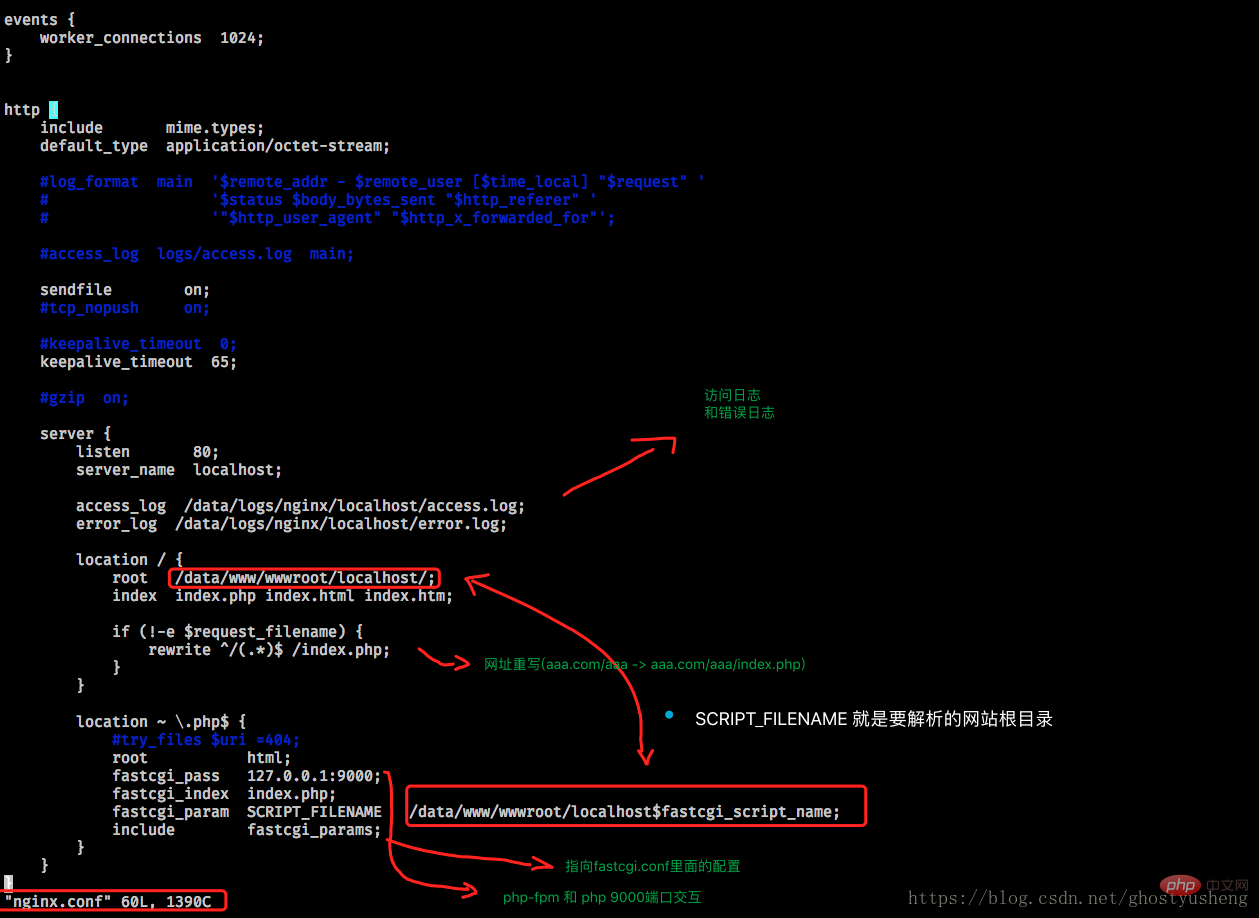
chkconfig --list nginx demo 配置:(不要忘记chown www-data:www-data 网站目录 不然没权限)
server {
	    listen      80;
	    server_name {{ server_name }};
	    access_log  /data/logs/nginx/{{ server_name }}/access.log;
	    error_log   /data/logs/nginx/{{ server_name }}/error.log;
    location / {
        index           index.php index.html index.htm;
        root            /data/www/wwwroot/{{ server_name }}/;

        if (!-e $request_filename) {
            rewrite ^/(.*)$ /index.php;
        }
    }

    location ~ \.php$ {
        include        fastcgi_params;
        fastcgi_pass   unix:/tmp/php-fcgi.sock;
        fastcgi_index  index.php;
    }
}
php-fpm配置 (重命名两个文件 其他看实际情况配置(略。。。)) 以上就是介绍Centos安装PHP7及配置php-fpm开机启动的详细内容,更多请关注模板之家(www.mb5.com.cn)其它相关文章! |