 推荐:css视频教程 CSS中的选择器优先级与!important权重.class选择器要高于标签选择器。#id选择器要高于.class选择器。- 标签选择器是优先级最低的选择器。
!important的属性它的权重值优先级最高的,大于所有的选择器。
标签选择器和.class选择器让我们进入标签选择器和.class选择器谁的优先级高实践,实践内容如:将HTML页面中的h2标签设置文本颜色。 代码块 <!DOCTYPE html>
<html lang="en">
<head>
<meta charset="UTF-8">
<meta name="viewport" content="width=device-width, initial-scale=1.0">
<meta http-equiv="X-UA-Compatible" content="ie=edge">
<title>优先级</title>
<style>
h2{
color: red; /*红色*/
}
.box{
color: springgreen; /*绿色*/
}
</style>
</head>
<body>
<h2 class="box">微笑是最初的信仰</h2>
</body>
</html>结果图 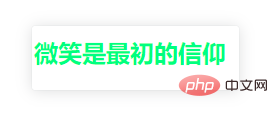
.class选择器和id选择器让我们进入.class选择器和id选择器谁的优先级高实践,实践内容如:将HTML页面中的h2标签设置文本颜色。 代码块 <!DOCTYPE html>
<html lang="en">
<head>
<meta charset="UTF-8">
<meta name="viewport" content="width=device-width, initial-scale=1.0">
<meta http-equiv="X-UA-Compatible" content="ie=edge">
<title>优先级</title>
<style>
h2{
color: red; /*红色*/
}
.box{
color: springgreen; /*绿色*/
}
#box{
color:blue; /*蓝色*/
}
</style>
</head>
<body>
<h2 class="box" id="box">微笑是最初的信仰</h2>
</body>
</html>结果图 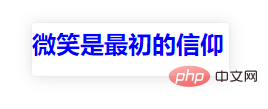
!important权重使用现在我们知道了标签选择器优先级最低,那么笔者将标签选择器添加!important属性呢,谁的优先级更高呢?
!important权重使用格式如下: color: red !important; /*红色*/ 注意:属性:值 !important属性值用空格隔开即可。 让我们进入 !important属性使用实践,看看!important属性威力有多大哈。 代码块 <!DOCTYPE html>
<html lang="en">
<head>
<meta charset="UTF-8">
<meta name="viewport" content="width=device-width, initial-scale=1.0">
<meta http-equiv="X-UA-Compatible" content="ie=edge">
<title>!important使用</title>
<style>
h2{
color: red !important; /*红色*/
}
.box{
color: springgreen; /*绿色*/
}
#box{
color:blue; /*蓝色*/
}
</style>
</head>
<body>
<h2 class="box" id="box">微笑是最初的信仰</h2>
</body>
</html>结果图 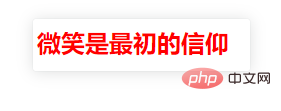
总结优先级从低到高如:标签选择器、.class选择器、#id选择器、!important属性 更多编程相关知识,请访问:编程教学!! 以上就是了解CSS的选择器优先级和!important权重的详细内容,更多请关注模板之家(www.mb5.com.cn)其它相关文章! |