bootstrap字体图标的引用方法:首先建一个fonts文件夹;然后放在和js、css文件同级目录下;最后通过“src: url('font/glyphicons-halflings-regular.eot');”方式引用字体图标即可。

推荐:《bootstrap教程》 Bootstrap正确引用字体图标: 补充:其实不需要下面这么麻烦,只需要建一个fonts文件夹放在和js,css文件同级目录下,就可以正确引用,关键是下面这几个文件得有: 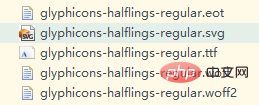
第一种(字体文件的路径请灵活改变)<style type="text/css">
@font-face {
font-family: 'Glyphicons Halflings';
src: url('font/glyphicons-halflings-regular.eot');
src: url('font/glyphicons-halflings-regular.eot?#iefix') format('embedded-opentype'), url('font/glyphicons-halflings-regular.woff') format('woff'), url('font/glyphicons-halflings-regular.ttf') format('truetype'), url('fonts/glyphicons-halflings-regular.svg#glyphicons_halflingsregular') format('svg');
}第二种<!--<style type="text/css">
@font-face {
font-family: 'Glyphicons Halflings';
src: url('font/glyphicons-halflings-regular.eot');
src: url('font/glyphicons-halflings-regular.eot?#iefix') format('embedded-opentype'),
url('font/glyphicons-halflings-regular.woff') format('woff'),
url('font/glyphicons-halflings-regular.ttf') format('truetype'),
url('font/glyphicons-halflings-regular.svg#glyphicons_halflingsregular') format('svg');
} 注意:用font-size属性调整字体图标的大小,且不会失真。 以上就是bootstrap字体图标怎么引用的详细内容,更多请关注模板之家(www.mb5.com.cn)其它相关文章! |



