区别:1、Taro不支持在类方法中定义JSX,而react支持;2、Taro不能在包含JSX元素的map循环中使用if表达式,而react可以;3、Taro不能使用Array.map之外的方法操作JSX数组,而react可以。

Taro 与 React 的差异(转自小册) 由于微信小程序的限制,React 中某些写法和特性在 Taro 中还未能实现,后续将会逐渐完善。 截止到本小册发布前,Taro 的最新版本为 1.1,因此以下讲解默认版本为 1.1。 暂不支持在 render() 之外的方法定义 JSX 由于微信小程序的 template 不能动态传值和传入函数,Taro 暂时也没办法支持在类方法中定义 JSX。 无效情况 class App extends Component {
_render() {
return <View />
}
}
class App extends Component {
renderHeader(showHeader) {
return showHeader && <Header />
}
}
class App extends Component {
renderHeader = (showHeader) => {
return showHeader& & <Header />
}
}解决方案
在 render 方法中定义。 class App extends Component {
render () {
const { showHeader, showMain } = this.state
const header = showHeader && <Header />
const main = showMain && <Main />
return (
<View>
{header}
{main}
</View>
)
}
}不能在包含 JSX 元素的 map 循环中使用 if 表达式 无效情况 numbers.map((number) => {
let element = null
const isOdd = number % 2
if (isOdd) {
element = <Custom />
}
return element
})
numbers.map((number) => {
let isOdd = false
if (number % 2) {
isOdd = true
}
return isOdd && <Custom />
})解决方案
尽量在 map 循环中使用条件表达式或逻辑表达式。 numbers.map((number) => {
const isOdd = number % 2
return isOdd ? <Custom /> : null
})
numbers.map((number) => {
const isOdd = number % 2
return isOdd && <Custom />
})不能使用 Array.map 之外的方法操作 JSX 数组 Taro 在小程序端实际上把 JSX 转换成了字符串模板,而一个原生 JSX 表达式实际上是一个 React/Nerv 元素(react - element)的构造器,因此在原生 JSX 中你可以对任何一组 React 元素进行操作。但在 Taro 中你只能使用 map 方法,Taro 转换成小程序中 wx:for。 无效情况 test.push(<View />)
numbers.forEach(numbers => {
if (someCase) {
a = <View />
}
})
test.shift(<View />)
components.find(component => {
return component === <View />
})
components.some(component => component.constructor.__proto__ === <View />.constructor)
numbers.filter(Boolean).map((number) => {
const element = <View />
return <View />
})解决方案
先处理好需要遍历的数组,然后再用处理好的数组调用 map 方法。 numbers.filter(isOdd).map((number) => <View />)
for (let index = 0; index < array.length; index++) {
// do you thing with array
}
const element = array.map(item => {
return <View />
})不能在 JSX 参数中使用匿名函数 无效情况 <View onClick={() => this.handleClick()} />
<View onClick={(e) => this.handleClick(e)} />
<View onClick={() => ({})} />
<View onClick={function () {}} />
<View onClick={function (e) {this.handleClick(e)}} />解决方案
使用 bind 或 类参数绑定函数。 <View onClick={this.props.hanldeClick.bind(this)} />不能在 JSX 参数中使用对象展开符 微信小程序组件要求每一个传入组件的参数都必须预先设定好,而对象展开符则是动态传入不固定数量的参数。所以 Taro 没有办法支持该功能。 无效情况 <View {...this.props} />
<View {...props} />
<Custom {...props} />解决方案
开发者自行赋值: render () {
const { id, title } = obj
return <View id={id} title={title} />
}不允许在 JSX 参数(props)中传入 JSX 元素 由于微信小程序内置的组件化的系统不能通过属性(props) 传函数,而 props 传递函数可以说是 React 体系的根基之一,我们只能自己实现一套组件化系统。而自制的组件化系统不能使用内置组件化的 slot 功能。两权相害取其轻,我们暂时只能不支持该功能。 无效情况 <Custom child={<View />} />
<Custom child={() => <View />} />
<Custom child={function () { <View /> }} />
<Custom child={ary.map(a => <View />)} />解决方案
通过 props 传值在 JSX 模板中预先判定显示内容,或通过 props.children 来嵌套子组件。 不支持无状态组件(Stateless Component) 由于微信的 template 能力有限,不支持动态传值和函数,Taro 暂时只支持一个文件只定义一个组件。为了避免开发者疑惑,暂时不支持定义 Stateless Component。 无效情况 function Test () {
return <View />}function Test (ary) {
return ary.map(() => <View />)}const Test = () => {
return <View />}const Test = function () {
return <View />}解决方案
使用 class 定义组件。 class App extends Component {
render () {
return (
<View />
)
}}命名规范
Taro 函数命名使用驼峰命名法,如onClick,由于微信小程序的 WXML 不支持传递函数,函数名编译后会以字符串的形式绑定在 WXML 上,囿于 WXML 的限制,函数名有三项限制: 方法名不能含有数字
方法名不能以下划线开头或结尾
方法名的长度不能大于 20
请遵守以上规则,否则编译后的代码在微信小程序中会报以下错误: 
推荐安装 ESLint 编辑器插件
Taro 有些写法跟 React 有些差异,可以通过安装 ESLint 相关的编辑器插件来获得人性化的提示。由于不同编辑器安装的插件有所不同,具体安装方法请自行搜索,这里不再赘述。 如下图,就是安装插件后获得的提示:
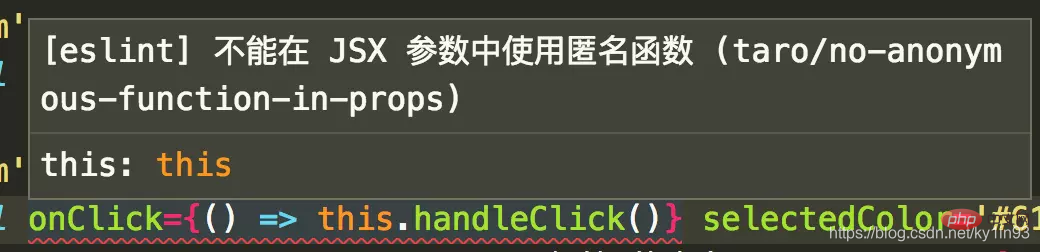

最佳编码方式
经过较长时间的探索与验证,目前 Taro 在微信小程序端是采用依托于小程序原生自定义组件系统来设计实现 Taro 组件化的,所以目前小程序端的组件化会受到小程序原生组件系统的限制,而同时为了实现以 React 方式编写代码的目标,Taro 本身做了一些编译时以及运行时的处理,这样也带来了一些值得注意的约束,所以有必要阐述一下 Taro 编码上的最佳实践。
组件样式说明
微信小程序的自定义组件样式默认是不能受外部样式影响的,例如在页面中引用了一个自定义组件,在页面样式中直接写自定义组件元素的样式是无法生效的。这一点,在 Taro 中也是一样,而这也是与大家认知的传统 Web 开发不太一样。 给组件设置 defaultProps
在微信小程序端的自定义组件中,只有在 properties 中指定的属性,才能从父组件传入并接收 Component({
properties: {
myProperty: { // 属性名
type: String, // 类型(必填),目前接受的类型包括:String, Number, Boolean, Object, Array, null(表示任意类型)
value: '', // 属性初始值(可选),如果未指定则会根据类型选择一个
observer: function (newVal, oldVal, changedPath) {
// 属性被改变时执行的函数(可选),也可以写成在 methods 段中定义的方法名字符串, 如:'_propertyChange'
// 通常 newVal 就是新设置的数据, oldVal 是旧数据
}
},
myProperty2: String // 简化的定义方式
}
...
})而在 Taro 中,对于在组件代码中使用到的来自 props 的属性,会在编译时被识别并加入到编译后的 properties 中,暂时支持到了以下写法 this.props.property
const { property } = this.props
const property = this.props.property但是一千个人心中有一千个哈姆雷特,不同人的代码写法肯定也不尽相同,所以 Taro 的编译肯定不能覆盖到所有的写法,而同时可能会有某一属性没有使用而是直接传递给子组件的情况,这种情况是编译时无论如何也处理不到的,这时候就需要大家在编码时给组件设置 defaultProps 来解决了。 组件设置的 defaultProps 会在运行时用来弥补编译时处理不到的情况,里面所有的属性都会被设置到 properties 中初始化组件,正确设置 defaultProps 可以避免很多异常的情况的出现。 组件传递函数属性名以 on 开头
在 Taro 中,父组件要往子组件传递函数,属性名必须以 on 开头 // 调用 Custom 组件,传入 handleEvent 函数,属性名为 `onTrigger`
class Parent extends Component {
handleEvent () {
}
render () {
return (
<Custom onTrigger={this.handleEvent}></Custom>
)
}
}这是因为,微信小程序端组件化是不能直接传递函数类型给子组件的,在 Taro 中是借助组件的事件机制来实现这一特性,而小程序中传入事件的时候属性名写法为 bindmyevent 或者 bind:myevent <!-- 当自定义组件触发“myevent”事件时,调用“onMyEvent”方法 -->
<component-tag-name bindmyevent="onMyEvent" />
<!-- 或者可以写成 -->
<component-tag-name bind:myevent="onMyEvent" /> 所以 Taro 中约定组件传递函数属性名以 on 开头,同时这也和内置组件的事件绑定写法保持一致了。 小程序端不要在组件中打印传入的函数
前面已经提到小程序端的组件传入函数的原理,所以在小程序端不要在组件中打印传入的函数,因为拿不到结果,但是 this.props.onXxx && this.props.onXxx() 这种判断函数是否传入来进行调用的写法是完全支持的。 小程序端不要将在模板中用到的数据设置为 undefined
由于小程序不支持将 data 中任何一项的 value 设为 undefined ,在 setState 的时候也请避免这么用。你可以使用 null 来替代。 小程序端不要在组件中打印 this.props.children
在微信小程序端是通过 来实现往自定义组件中传入元素的,而 Taro 利用 this.props.children 在编译时实现了这一功能, this.props.children 会直接被编译成 标签,所以它在小程序端属于语法糖的存在,请不要在组件中打印它。 组件属性传递注意
不要以 id、class、style 作为自定义组件的属性与内部 state 的名称,因为这些属性名在微信小程序中会丢失。 组件 state 与 props 里字段重名的问题
不要在 state 与 props 上用同名的字段,因为这些被字段在微信小程序中都会挂在 data 上。 小程序中页面生命周期 componentWillMount 不一致问题
由于微信小程序里页面在 onLoad 时才能拿到页面的路由参数,而页面 onLoad 前组件都已经 attached 了。因此页面的 componentWillMount 可能会与预期不太一致。例如: // 错误写法
render () {
// 在 willMount 之前无法拿到路由参数
const abc = this.$router.params.abc
return <Custom adc={abc} />
}
// 正确写法
componentWillMount () {
const abc = this.$router.params.abc
this.setState({
abc
})
}
render () {
// 增加一个兼容判断
return this.state.abc && <Custom adc={abc} />
}对于不需要等到页面 willMount 之后取路由参数的页面则没有任何影响。 组件的 constructor 与 render 提前调用
很多细心的开发者应该已经注意到了,在 Taro 编译到小程序端后,组件的 constructor 与 render 默认会多调用一次,表现得与 React 不太一致。 这是因为,Taro 的组件编译后就是小程序的自定义组件,而小程序的自定义组件的初始化时是可以指定 data 来让组件拥有初始化数据的。开发者一般会在组件的 constructor 中设置一些初始化的 state,同时也可能会在 render 中处理 state 与 props 产生新的数据,在 Taro 中多出的这一次提前调用,就是为了收集组件的初始化数据,给自定义组件提前生成 data ,以保证组件初始化时能带有数据,让组件初次渲染正常。 所以,在编码时,需要在处理数据的时候做一些容错处理,这样可以避免在 constructor 与 render 提前调用时出现由于没有数据导致出错的情况。 JS 编码必须用单引号
在 Taro 中,JS 代码里必须书写单引号,特别是 JSX 中,如果出现双引号,可能会导致编译错误。 环境变量 process.env 的使用
不要以解构的方式来获取通过 env 配置的 process.env 环境变量,请直接以完整书写的方式 process.env.NODE_ENV 来进行使用 // 错误写法,不支持
const { NODE_ENV = 'development' } = process.env
if (NODE_ENV === 'development') {
...
}
// 正确写法
if (process.env.NODE_ENV === 'development') {
}预加载
在微信小程序中,从调用 Taro.navigateTo、Taro.redirectTo 或 Taro.switchTab 后,到页面触发 componentWillMount 会有一定延时。因此一些网络请求可以提前到发起跳转前一刻去请求。 Taro 提供了 componentWillPreload 钩子,它接收页面跳转的参数作为参数。可以把需要预加载的内容通过 return 返回,然后在页面触发 componentWillMount 后即可通过 this.$preloadData 获取到预加载的内容。 class Index extends Component {
componentWillMount () {
console.log('isFetching: ', this.isFetching)
this.$preloadData
.then(res => {
console.log('res: ', res)
this.isFetching = false
})
}
componentWillPreload (params) {
return this.fetchData(params.url)
}
fetchData () {
this.isFetching = true
...
}
}小结
由于 JSX 中的写法千变万化,我们不能支持到所有的 JSX 写法,同时由于微信小程序端的限制,也有部分 JSX 的优秀用法暂时不能得到很好地支持。这些不支持的写法都可以通过其他写法来规避,同时 ESLint 相关插件都能很好地提醒用户避免踩坑。了解 Taro 这些注意事项后,接下来我们就来动手实现一个简单的 Todo 项目。 更多编程相关知识,请访问:编程学习网站!! 以上就是taro和react的区别是什么?的详细内容,更多请关注模板之家(www.mb5.com.cn)其它相关文章! |



